Best Minecraft Addons 2026: One Block Survival Guide
One Block is a creative MCPE addon that starts you on a single floating block. Break it repeatedly to expand your island and gather resources in this unique survival mode.


Created by GAVTI
One Block is a Minecraft addon that strips survival down to its core concept: start with nothing but a single floating block, break it, and watch your world expand one resource at a time. Created by GAVTI, it's a lightweight addition to Bedrock Edition that fundamentally changes how progression works without replacing vanilla mechanics.
If you've ever played skyblock or island survival modes, you'll recognize the idea. But One Block takes a different approach. Instead of a pre-built island, you get the bare minimum and build from there. Each time you break the main block, a new one appears and drops random resources. It's repetitive in the best way, and it transforms the early game into something that feels earned rather than given.

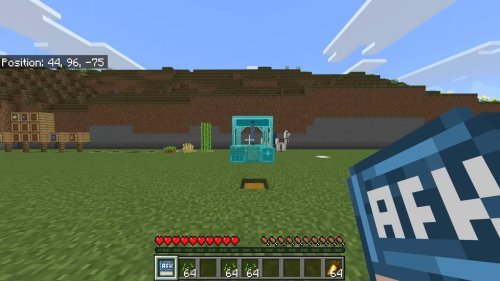
Photos by GAVTI
How One Block addon works in Minecraft Bedrock
The addon operates through a simple loop. You start on your single block in The Void. When you mine it, another block appears in the same spot and you get a random drop. Those drops can be wood, stone, dirt, or whatever the progression phase allows. Break it again, get more stuff, repeat until you have enough to craft a pickaxe or build a platform.
The genius part is that the addon doesn't fight vanilla Minecraft. You're still crafting, still gathering, still building. Nothing is replaced or hidden behind menus. It just removes the part where you spawn in a fully-formed world and gives you actual scarcity to overcome.
Progression happens across multiple phases. Early on, you're limited to basic resources. As you advance, caves appear on your island. Then nature blocks unlock. Eventually, ores show up. This layered approach means you're not finding diamonds in the first five minutes, and that's exactly the point.

Key features of One Block for MCPE
- Breaking the main block generates a new block and drops random resources from that progression phase
- Multiple tiers of unlocks: basic resources, caves, nature biome blocks, and ores
- Loot chests spawn around your growing island for extra rewards
- Works with both solo and multiplayer survival worlds
- Lightweight design that doesn't tank performance
- Fully compatible with vanilla Minecraft mechanics and crafting recipes
- Requires The Void flat world type to function correctly

What makes this addon different from other Minecraft addons
Most MCPE addons add new content: mobs, items, biomes, or visual effects. One Block doesn't add anything. It removes options. That's harder to design and more rewarding to play.
Compared to other survival overhauls, One Block stays true to vanilla progression. You won't find yourself confused about where recipes went or how basic tools work. The addon layers on top of what you already know, which means anyone can pick it up without a tutorial.
The performance is solid too. Since it's not loaded with custom models, textures, or new entities, it runs smooth on lower-end devices. You'll get stable FPS even on older phones or tablets.

Who should try One Block addon
If you've played standard Minecraft survival a hundred times and want the early game to feel risky again, this is for you. The constant pressure of limited resources creates real tension. You can't just strip-mine for an hour. You have to be intentional.
It's also excellent for streamers and content creators. The format is inherently watchable. Viewers can follow your progression clearly. Plus, GAVTI grants permission for use in videos, maps, servers, and streams as long as you credit the creator, so you won't run into licensing issues.
Groups playing together in multiplayer will find it works well too. Everyone shares the same block, so cooperation is built in. Faster progression means more cooperation, which changes how teamwork shapes your playthrough.
How to install One Block addon in Minecraft Bedrock
Installation is straightforward. Download the .mcaddon file and open it directly in Minecraft Bedrock Edition. The game will ask you to confirm adding the Behavior Pack and Resource Pack. Accept both.
Here's the critical step: when you create a new world, choose the Flat World preset and set the world type to The Void. This is required for the addon to function. Without it, the block won't generate properly and you'll just spawn in an empty void with nothing to interact with.
Once you launch the world, you'll appear on your single block. Start breaking it and get to work.
Common questions about One Block
What are the best Minecraft addons for survival mode in 2026?
One Block is a top choice if you want survival stripped to essentials. If you prefer new content added on top of standard survival, look for addons that add mobs or ores instead. One Block works best when you want a challenge, not more options.
Can I use One Block in multiplayer and stream it?
Yes to both. The addon supports multiplayer worlds, and GAVTI explicitly allows streaming and content creation. Just credit the creator in your description or on-screen.
Do promotional images match what I'll see in-game?
GAVTI notes that promotional images may be AI-enhanced, so the actual in-game appearance could differ. Expect cleaner, more straightforward visuals than the promotional material shows.
Is this addon lightweight enough for older devices?
Yes. One Block is optimized for performance and doesn't require new models or heavy textures. It should run fine on mid-range and older devices that handle vanilla Minecraft Bedrock.
Share
What's Your Reaction?
 Like
0
Like
0
 Dislike
0
Dislike
0
 Love
0
Love
0
 Funny
0
Funny
0
 Angry
0
Angry
0
 Sad
0
Sad
0
 Wow
0
Wow
0