Best Minecraft addons 2026: Diamond's Shop review
Diamond's Shop is a top MCPE addon for creating player-run stores with custom currency and trading. Perfect for multiplayer Bedrock servers.


Created by TheDiamondBlue1
Diamond's Shop is an economy addon designed by TheDiamondBlue1 that lets players build and run their own stores on Minecraft Bedrock servers. It adds a full-featured shop system with custom currency, inventory management, and player-to-player trading mechanics without requiring external mods or server modifications.
If you run a multiplayer server or play on one where players want control over their own shops, this addon transforms how your economy works. Instead of relying on admin-managed vendors, every player can open a storefront, set their own prices, and manage inventory. It's one of the best Minecraft addons for servers that value player agency and trading.
Photos by TheDiamondBlue1
What Diamond's Shop adds to your server
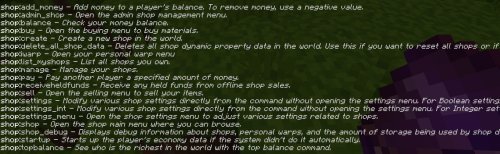
The core feature is a command-driven shop system. Players use the /shop command with an identifier to access shop menus, buy items, and check prices. The addon includes over 20 custom commands that handle everything from shop creation to transaction history.
The currency system uses dollars (displayed with the $ symbol) and comes with preset buy and sell values for common materials. You can adjust these prices in the configuration file to match your server's economy balance. Items remember their custom names, lore text, enchantments, durability, and book contents when bought and sold, which keeps special gear useful across transactions.
Stock management is flexible. Admins can set exact limits on how many of each item a shop can hold, or enable unlimited stock so a shop never runs out. When a player is offline, their shop stays accessible and transactions get queued. When they return, they're notified of pending payments and held funds.
Personal warps: a second economy layer
Beyond shops, Diamond's Shop includes a warping system that ties into the economy. Players create personal teleport points they can name and customize. The first warp is free, but each additional warp costs $500. This adds another layer of progression and gives players a reason to earn currency.
Two warp modes let you choose how players teleport. Advance mode teleports to exact coordinates you specify. Simple mode teleports to the center of a block, which is less precise but faster to set up. You can also set warp rotation so a player lands facing a specific direction, useful for controlling how they enter a shop or base.
Warps work across dimensions, and the addon supports custom dimensions created with the Dimensional Travels addon, so your server's overworld, nether, and end all support fast travel.

How to set up shops for your server
Creating a shop is straightforward. Players run a command to define the shop's name, description, a unique identifier, and an icon block. Once created, only that player can manage the shop when they're online. Admins have full control to edit, rename, transfer ownership, or delete any shop on the server.
Items placed in a shop retain all their data. If you're selling an enchanted diamond sword with a custom name and lore, the buyer gets the exact same item. The exception is items with dynamic NBT data or complex properties, which lose their custom information during sale.
Here's what Diamond's Shop handles:
- Over 20 custom shop commands with full /shop identifier syntax
- Customizable shop names, descriptions, identifiers, and icons for each store
- Item preservation during trades (custom names, lore, enchantments, durability, book data)
- Unlimited or limited stock options per shop
- Dollar-based currency with configurable buy and sell prices
- Player-specific shop menus that only appear when the owner is online
- Admin tools to manage all shops on the server
- Offline transaction queueing and held funds notifications
- Personal warps with free first warp, $500 per additional warp
- Warp rotation for facing direction control
- Support for custom dimensions via compatible addons

Installing Diamond's Shop on Bedrock
The addon comes as a .mcpack file. Download it and open it in Minecraft. The game will import it automatically and add it to your world or server. Once activated, all shop commands become available to players.
The configuration file is editable, so you can tweak item prices, currency values, and warp costs before launching. This is important because server economies vary widely, and you want prices to match your game's progression speed.
Things to know about transactions and data
Transactions cancel if a player disconnects during a purchase. This prevents money loss or duplicate items from partial trades. When a shop owner comes back online, held funds get released and they're notified.
If all shop data is deleted (usually by an admin reset), the server announces it to all players so no one is caught off guard. Warps and shops are treated as separate data, so you can reset one without losing the other.
Items that can't preserve their NBT data will lose custom properties when sold. This mainly affects modded items or very complex gear, but it's good to know before setting prices on those items.
Who should use this addon
If you run a Bedrock server with stable players, Diamond's Shop solves a major problem: how to let players control their own economy. It's perfect for creative or survival servers where players want to run shops and trade freely without admin involvement. Smaller communities benefit most because the owner-online requirement keeps shops personal and tied to actual players.
Single-player worlds can use it too if you want to practice building shops or test economy balancing, though the multiplayer trading features are where this addon shines.
FAQs about Diamond's Shop
Is Diamond's Shop one of the best MCPE addons for economy servers?
It's a solid choice if you want player-run shops with a currency system. The command structure is clean, the warp layer adds depth, and admin controls keep things manageable. It works best on small to medium servers where player relationships matter.
Can I change prices in Diamond's Shop after installing?
Yes. The configuration file lets you adjust buy and sell values for every item. You can also control warp costs and stock limits. Changes take effect when you reload the addon.
What happens if a player goes offline with pending transactions?
Their shop stays open and transactions are held. When they return, they get a notification of pending payments and held funds, and can then collect their earnings. If they disconnect mid-purchase, the transaction cancels entirely to prevent loss.
Does Diamond's Shop work with other economy addons?
It can coexist with other addons as long as they don't use the same command structure. The /shop command is specific to this addon, so conflicts are rare. Test on a copy of your world first to be sure.
Share
What's Your Reaction?
 Like
0
Like
0
 Dislike
0
Dislike
0
 Love
0
Love
0
 Funny
0
Funny
0
 Angry
0
Angry
0
 Sad
0
Sad
0
 Wow
0
Wow
0