Best Minecraft Addons 2026: Corn Delight Review
Corn Delight adds farmable maize crops, corn kernels, and cooking recipes to Minecraft Bedrock. A Java mod port for MCPE farming gameplay.


Created by Moaswies
Corn Delight is a Bedrock Edition addon that brings a farming mod staple to Minecraft MCPE: maize crops you can plant, harvest, and cook with. It's a port of a popular Java mod, translated into an addon for anyone playing on mobile, console, or Windows 10/11 Bedrock Edition who wants to expand their farming gameplay without switching versions.
If you're looking for ways to deepen your survival world's food system, this addon fills a specific gap. Most Minecraft addons focus on combat, building, or cosmetics. Corn Delight targets the farming side, adding a real crop cycle with multiple uses.
Photos by Moaswies
What Corn Delight actually adds to your world
The core idea is simple: maize grows on farmland just like wheat or carrots. You plant the seeds, wait for growth stages, harvest the crop, and either eat the maize directly or process it further. That last part is where the addon gets practical.
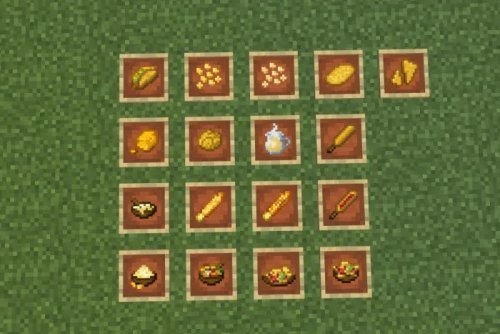
You can cut corn on a cutting board to obtain corn kernels. Those kernels become a tradeable resource. Store them in dedicated storage blocks so your chests don't overflow during a big harvest. The addon includes multiple food items built around corn, plus cooking pot recipes that let you prepare dishes using your fresh harvest.
- Maize crop growing on farmland with multiple growth stages
- Wild corn that generates naturally in your world
- Corn kernels obtained by cutting maize on a cutting board
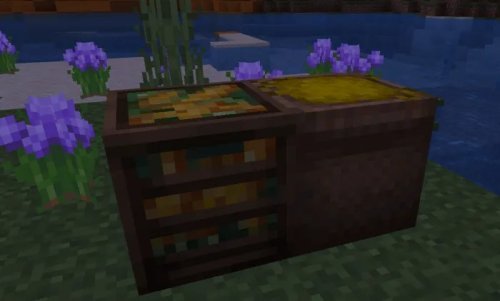
- Storage blocks sized for corn kernels and whole maize
- Multiple food and drink recipes using corn
- Cooking pot integration for food preparation
Performance and compatibility on Bedrock devices
Corn Delight is lightweight. It doesn't add fancy particle effects, new biomes, or complicated mob AI. What you get is straightforward: crops, items, recipes, and blocks. This means the addon runs smooth on older phones and tablets, as well as on Switch and Xbox.
You need to know upfront that this addon requires Farmer's Delight Bedrock (Unofficial) as a dependency. You need both addons enabled in your world, and they need to load in the right order. Farmer's Delight Bedrock provides the cooking pot mechanic that Corn Delight recipes rely on. Think of it as the foundation that Corn Delight builds on top of.
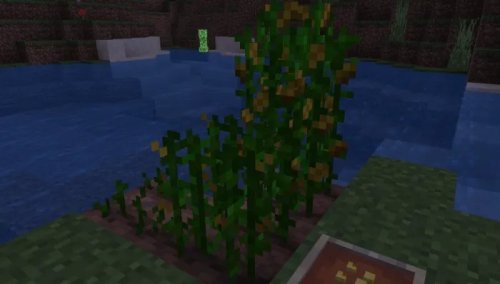
Where wild corn spawns and how farming works
Corn generates naturally in the world, so exploration pays off. You'll find wild maize growing in certain areas, which you can harvest to kickstart your farm. Once you have seeds, the cycle works like vanilla farming: plant on hydrated farmland, wait for rain or place water nearby, and watch your crops grow through visible stages.
The addon includes corn kernel seeds that you can plant after harvesting. This means a working farm produces two resources: maize itself and kernels. Each has different uses in recipes, so both matter.
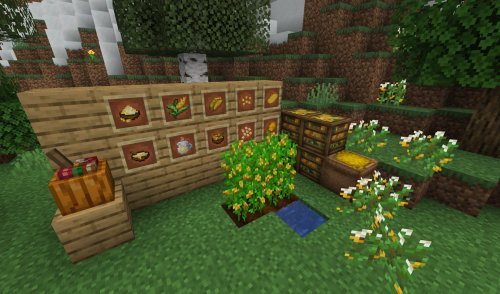
Cooking recipes and food items
Raw maize is edible, but the real depth comes from cooking pot recipes. You combine corn with other ingredients to make prepared foods and drinks. The addon doesn't go overboard here. Recipes are tied to what corn brings: nutritious side dishes and beverages that fit a farming aesthetic.
Storage blocks for corn and kernels help keep your base organized if you're farming at scale. A single harvest can yield dozens of items, and having dedicated storage makes restocking recipes simple.
How to install Corn Delight on Bedrock
Corn Delight comes as a .mcpack file. On most devices, opening the file launches Minecraft and imports it automatically. On Windows, you may need to navigate to your addons folder manually.
After installing, create a new world or edit an existing one. Open world settings, go to addons, and add both Corn Delight and Farmer's Delight Bedrock (Unofficial) to your world. Make sure both are enabled and that Farmer's Delight loads first. Apply changes, load the world, and you're ready to farm.
If you see missing items or recipes don't work, double-check that Farmer's Delight is installed and active. The addon won't function without it.
Is Corn Delight right for your world?
This addon suits players who enjoy the farm-to-table aspect of survival mode. If you're building a detailed farm, running a role-play world, or just want more crops to harvest and cook with, it fits well. It's less useful for competitive servers or creative-focused play.
The mod was originally created by sz0999312 and ported to Bedrock by Moaswies under the MIT License. You're getting a well-tested Java concept translated to MCPE, not an experimental feature.
Common questions about Corn Delight
Do I need Farmer's Delight Bedrock to use Corn Delight?
Yes. Farmer's Delight Bedrock (Unofficial) is a required dependency. Corn Delight's cooking pot recipes won't work without it installed and active in your world.
What are the best Minecraft addons if I like farming?
Corn Delight pairs well with other farming and food addons, but it stands alone. If you want more crops or cooking depth, pairing it with Farmer's Delight Bedrock gives you the full experience the addon is designed around.
Can I use Corn Delight on MCPE mobile?
Yes. The addon runs on any Bedrock Edition device, including Android and iOS phones and tablets. Performance is good since it doesn't add heavy graphics or complex mechanics.
Does wild corn spawn in existing worlds?
New worlds generated after installing the addon will include wild corn in appropriate areas. Existing worlds may not generate new corn biome features, but you can find corn seeds and maize through the creative menu or by enabling cheats and giving yourself the items.
Share
What's Your Reaction?
 Like
0
Like
0
 Dislike
0
Dislike
0
 Love
0
Love
0
 Funny
0
Funny
0
 Angry
0
Angry
0
 Sad
0
Sad
0
 Wow
0
Wow
0