Furniture Craft Minecraft: Add Craftable Decor to Bedrock
Furniture Craft addon adds craftable furniture to Minecraft Bedrock. Build chairs, tables, sofas, and TVs in survival mode using vanilla materials.

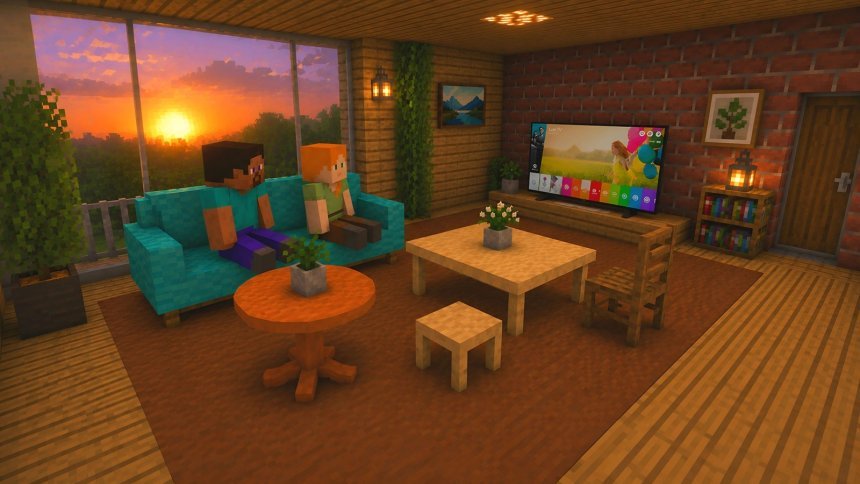
Created by FleetMc Studio
Furniture Craft is an addon for Minecraft Bedrock that lets you craft furniture items to decorate your survival mode worlds. You can now build actual chairs, tables, sofas, and televisions using standard vanilla Minecraft materials instead of placing down single blocks.
This addon fills a gap that many Bedrock players have felt for years. Minecraft's default blocks are great, but they don't give you the same sense of home that real furniture does. With Furniture Craft, your bases actually start to feel lived-in.
What furniture types are included
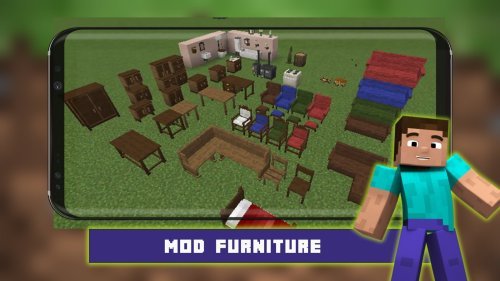
The addon gives you six types of furniture to work with. You get chairs and tables in three sizes (standard, small, and large), plus sofas and televisions. That range covers most of what you'd want in a house without overwhelming you with too many options to remember.
Each piece uses recipes built from materials you already have. There's no hidden crafting table or special UI. You use the normal crafting grid, which means the addon integrates cleanly into survival mode without breaking the feel of vanilla Minecraft.
- Six furniture types: chairs, standard tables, small tables, large tables, sofas, televisions
- All recipes use vanilla Minecraft materials (no custom ingredients)
- Each item has its own defined crafting recipe
- Works in survival mode without Creative Mode or commands
- Compatible with the achievement system
- Lightweight and optimized for stable performance
- No Experimental Gameplay required

Performance and compatibility
One concern with addons is lag. Furniture Craft is built to be lightweight, so it won't drop your FPS or cause stuttering when you load a world full of decorated bases.
The addon also works with Minecraft's achievement system, so you won't lose progress if you're working toward unlocking milestones. It doesn't require Experimental Gameplay to be turned on, so setup is straightforward. You download, import, enable the Behavior Pack, and you're ready to start building.
How to install Furniture Craft on Bedrock
Installation follows the standard addon process for Minecraft Bedrock and MCPE.
- Download the addon file (it will be a .mcpack file)
- Open or import the file into Minecraft
- Enable the Behavior Pack when prompted
- Load into a world and start crafting furniture
The addon should appear in your Behavior Packs list once imported. Make sure it's toggled on before you create or open a world. If you're playing on a device where Minecraft auto-downloads behavior packs, you may not even need to manually import it.

Who should try this addon
If you play survival mode and care about base aesthetics, this addon is for you. It's especially useful for players who find vanilla decoration blocks limiting or who want their homes to feel more furnished and less blocky.
Builders on Bedrock (phone, tablet, console) have fewer decoration options than Java Edition players. Addons like this help close that gap. If you've ever wished you could place a chair that actually looks like a chair instead of stacking stairs, you understand the appeal.
The addon also works well in multiplayer worlds. Everyone in a realm or split-screen world can use the same recipes, so there's no confusion about how to craft items.
Furniture crafting recipes in Minecraft Bedrock
The recipes for each furniture item are designed to be intuitive. Since they use vanilla materials, you're not hunting for obscure crafting ingredients. If you know how to craft basic Minecraft items, you'll figure out the furniture recipes quickly, or you can look them up on the creator's support page.
Standard tables and chairs use straightforward combinations of wood and other common blocks. Sofas tend to require wool or similar soft materials, which makes sense thematically. Televisions are more complex but still use materials you'd expect, like copper or redstone components.
This approach keeps the addon accessible without dumbing down the crafting system. You still feel like you're making something. You're not just getting free items.
Support and bug reporting
Furniture Craft was created by FleetMc Studio. If you run into bugs or have feedback, there's a bug reporting system available. The creator also accepts donations via Ko-fi if you want to support continued development.
This is good to know because addon stability matters. If something breaks in a future Minecraft update, you want creators who are responsive and willing to fix things. FleetMc Studio has set up proper channels for this.
Frequently asked questions
How do you craft furniture in Minecraft Bedrock?
With this addon, you use the normal crafting grid. Each furniture item (chairs, tables, sofas, TVs) has a specific recipe made from vanilla materials like wood, wool, and stone. There's no special crafting table required.
Can you craft furniture in Minecraft PE?
Yes, but only if you install an addon like Furniture Craft. Vanilla Minecraft PE doesn't have craftable furniture. Once you add the addon, crafting works the same way it does on Bedrock console or Windows.
Does this addon work in survival mode without Creative Mode?
Yes. You gather materials and craft furniture using the standard crafting system, just like you would with any other item in survival mode.
Do I need Experimental Gameplay enabled for Furniture Craft?
No. The addon works with standard Minecraft Bedrock settings, so you don't need to toggle any experimental features to use it.
Share
What's Your Reaction?
 Like
0
Like
0
 Dislike
0
Dislike
0
 Love
0
Love
0
 Funny
0
Funny
0
 Angry
0
Angry
0
 Sad
0
Sad
0
 Wow
0
Wow
0