Shulker Preview for Minecraft Bedrock: Hover to See Contents
Shulker preview addon for Minecraft Bedrock displays box contents on hover. See what's inside shulker boxes instantly without opening them. Works on MCPE.

Created by BlockPlay
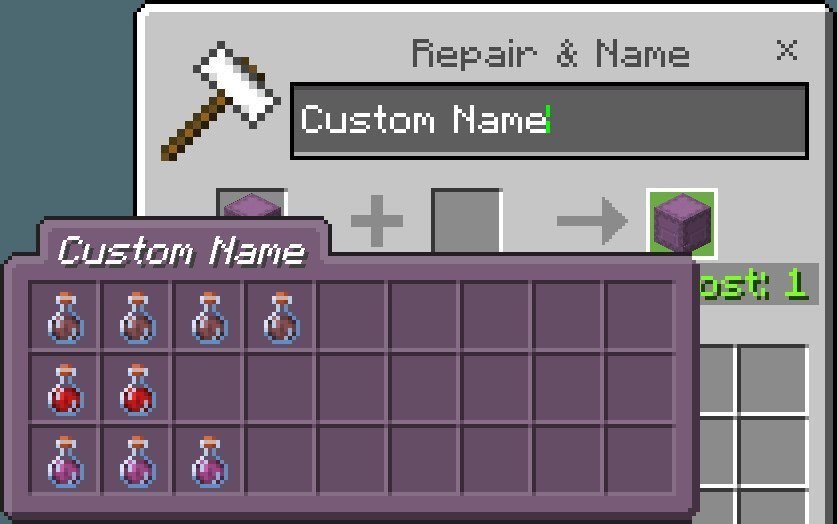
Shulker Preview is a lightweight addon for Minecraft Bedrock that shows you what items are stored inside a shulker box the moment you hover your cursor over it in your inventory. You don't have to open boxes to check what's inside, and you don't have to hunt through stacks of identical containers. Created by BlockPlay, this addon removes the guesswork and saves you time when managing your storage.
The tooltip appears instantly whenever you hover over a shulker box, displaying all the items packed inside without requiring you to break the block, open a menu, or toggle any settings. Once you start using it, this tool feels essential.

Photos by BlockPlay
What does shulker preview actually do?
The core function is straightforward: when you point your cursor at a shulker box in your inventory, a tooltip pops up showing every item inside. This works exactly like hovering over an enchanted book to see its enchantments, except now applied to containers. The preview activates automatically without any configuration needed on your part.
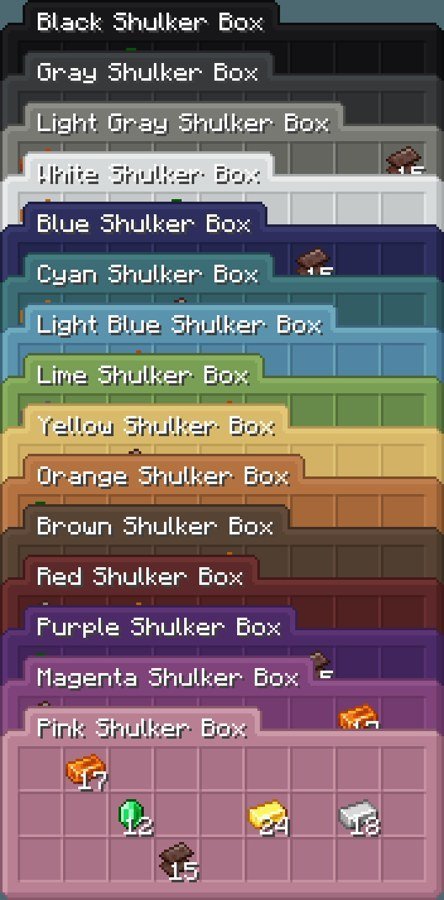
The addon also integrates with Minecraft's native shulker box mechanics. You can still color your shulker boxes with dye by interacting with them, and you can rename them using anvils or naming tags. The preview tooltip respects these customizations, making it easier to organize complex storage systems where you might have ten purple boxes that each serve a different purpose.
Why this matters for your inventory management
Anyone who plays survival mode long enough ends up with a storage room full of shulker boxes. It's the endgame solution for keeping your base organized. But the vanilla game forces you to either memorize what's in each box or open them one by one to find what you need. This addon eliminates that friction entirely.
Late-game players benefit the most. If you're sorting ores, building materials, enchanted tools, or potion ingredients into separate boxes, the ability to preview contents while moving items around saves minutes per session. Players who've invested time in decorative storage rooms or organized vaults find that preview tooltips make the system actually usable without constant box-opening.
Features and what you get
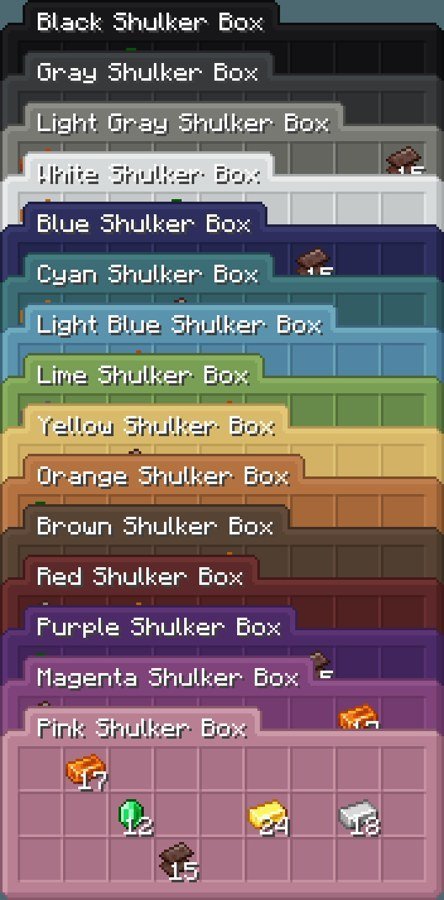
- Hover tooltips show all items stored inside shulker boxes instantly
- Works with colored shulker boxes (dye-customized containers)
- Displays custom names applied to boxes
- Multiple color options for the preview display itself
- Activates automatically without toggles or configuration steps

Installing shulker preview on Minecraft Bedrock and MCPE
This addon requires both a resource pack and a behavior pack. The resource pack is the visual component (what you see on screen), and the behavior pack is the code that makes the preview function work. Both must be applied to your world for the addon to activate.
Start by downloading the addon file, which comes as a .mcpack file. Open it, and Bedrock will recognize it and automatically import both packs. Once imported, create a new world or open an existing one. Go into world settings, navigate to the resource packs and behavior packs sections, and enable the shulker preview packs. The order usually doesn't matter for this addon, but some players prefer to place behavior packs before resource packs alphabetically.
After applying both packs, save your world settings and load in. Hover over any shulker box in your inventory, and the tooltip should appear immediately. If it doesn't, double-check that both packs are actually enabled (not just available) in your world settings.
Performance and compatibility
The addon is lightweight. It doesn't add new blocks, mobs, or complex mechanics that demand processing power. Most Bedrock devices and MCPE phones won't notice any FPS impact from running it. Older devices benefit from this kind of minimal overhead addon.
Compatibility is broad because the addon works with vanilla shulker boxes and doesn't modify core game systems. It plays nicely with other quality-of-life addons and won't conflict with building or exploration tools. The one thing to verify is whether your version of Bedrock is up to date, since older versions sometimes have quirks with how tooltips render.
Who should try shulker preview?
Survival players with organized storage systems see the biggest benefit. If you have a single shulker box or two, the addon is a nice-to-have. If you have twenty, it becomes genuinely useful. Creative builders who use shulker boxes for building material organization also appreciate cutting down on clicks when assembling large projects.
Multiplayer server players might want to check with admins before installing, since some servers restrict addons. But for single-player worlds and most casual multiplayer realms, it's perfectly compatible.
FAQ
Does shulker preview work on Minecraft MCPE?
Yes. The addon runs on Bedrock Edition, which includes MCPE on phones and tablets. Download it the same way you would on a console or computer.
Do I need configuration to use shulker preview?
No. Once both packs are enabled in your world, the preview tooltips activate automatically when you hover. There are no toggles or settings to adjust.
Can I use shulker preview with other addons?
Generally yes. It doesn't modify core game systems or block mechanics, so it coexists well with most other addons. If you run many heavy addons at once, check your FPS, but shulker preview itself is minimal.
What's the difference between a shulker preview mod and this addon?
Minecraft Bedrock uses addons, not mods. Java Edition players sometimes call addons "mods" casually, but they function the same way on Bedrock—they're downloadable modifications to your game.
Share
What's Your Reaction?
 Like
0
Like
0
 Dislike
0
Dislike
0
 Love
0
Love
0
 Funny
0
Funny
0
 Angry
0
Angry
0
 Sad
0
Sad
0
 Wow
0
Wow
0