Stone Tombs addon for Minecraft Bedrock: death recovery guide
Stone Tombs addon transforms death into a recoverable mechanic using tombstone blocks. Store items in graves and unlock them with keys in MCPE.

Created by Iced Fox Studios
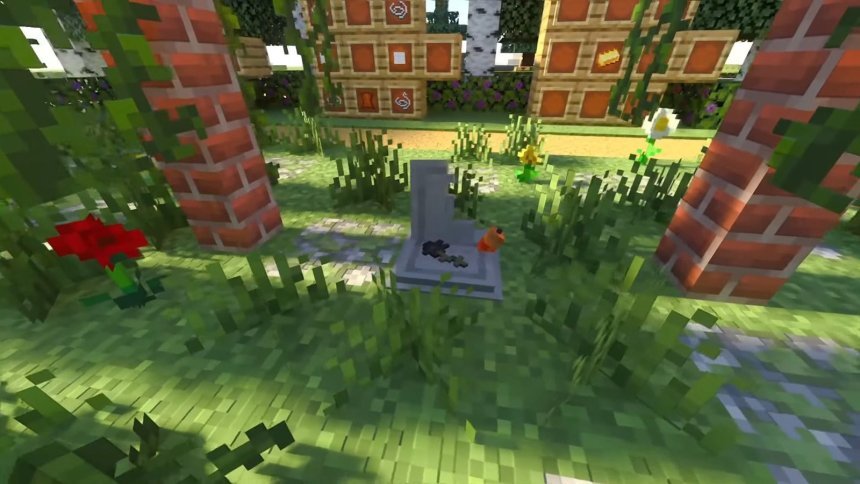
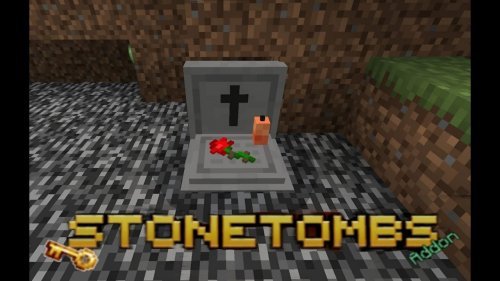
Stone Tombs is an addon that replaces Minecraft's standard death mechanic with a recoverable tombstone system. When you die, your inventory doesn't scatter across the ground. Instead, it locks inside a physical tombstone block that only you (or someone with a key) can open.
This addon changes how death feels in survival mode. You get a second chance instead of losing items permanently or scrambling to retrieve them before they despawn. The tombstone stays in the world indefinitely, so you have time to regroup, gather resources, or organize a recovery mission with friends.
How tombstones work in this addon
When you die, a tombstone block appears at your death location. The block is real, not an entity that can glitch through terrain or disappear. Your inventory items are stored inside it, protected from the environment and other players until you unlock it.
To claim your items back, you need a key. The addon uses a key-based system that you craft or obtain. This prevents accidental or intentional theft in multiplayer servers and creates a small barrier between death and recovery, keeping the stakes meaningful.
The tombstone itself has an interactive menu. You can see what's inside without opening it fully, manage which items you take out, and claim your grave through a straightforward interface instead of clicking on the block repeatedly.
Visual customization and design options
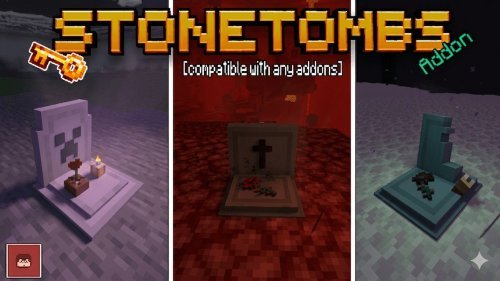
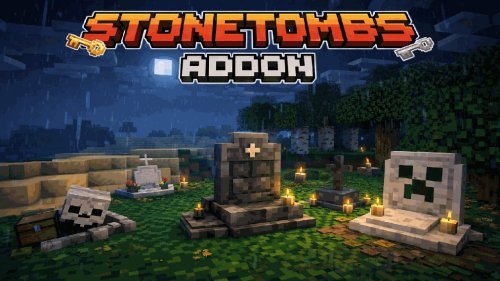
Stone Tombs comes with multiple visual styles and material options. You can choose how your tombstones look. The addon lets you pick stone, diorite, different colored blocks, or styles that match your world's aesthetic.
The appearance of graves can be customized through the addon's configuration settings. If you're building in a particular style or want graves to blend into your landscape rather than stand out as monuments, you have flexibility. The addon includes particle effects and sound effects that play when you place or interact with a grave, making the experience feel finished.

Why this addon works for multiplayer
Death mechanics break down in multiplayer without clear rules. One player's lost items become another player's loot opportunity. Stone Tombs solves this by making graves personal and locked. When your friend dies on a shared server, their tombstone belongs to them, and you can't raid it. This prevents the frustration of losing progress to other players and keeps the group's trust intact.
The addon scales well across different server sizes because the key system works the same whether you're playing with one other person or ten. Every player's grave is distinct, every recovery is intentional, and disputes over loot don't happen.
Features breakdown
- Tombstone blocks placed physically in the world upon death
- Inventory items stored securely inside graves
- Key-based unlocking system to control access
- Multiple grave styles and material customization options
- Interactive menus for managing and claiming graves
- Particle and sound effects for visual and audio feedback
- Configurable tombstone appearance
- Built for multiplayer item recovery without grief
Installing Stone Tombs on Minecraft Bedrock and MCPE
The addon comes as one or more .mcpack files. To install on Bedrock or MCPE, download the packs and open them. Your Minecraft launcher will automatically import them into the correct folder.
The addon is available on both CurseForge and MCPEDL. CurseForge may upload both file packs while MCPEDL doesn't, so if you're missing a pack on MCPEDL, grab it directly from CurseForge. Once installed, enable the addon in your world settings before creating or loading a survival world.
After activating the addon, the tombstone mechanic will replace your normal death drops. Test it in a safe area first to see how the grave appears and how the key system works in your setup.
Getting early access and updates
Stone Tombs is created by Iced Fox Studios. They offer exclusive early access to new updates and features on their official website. If you want to try experimental versions or support the creator directly, visit their site. CurseForge and MCPEDL get updates, but the official source receives them first.
Common questions about Stone Tombs
Are addons free for Minecraft Bedrock and MCPE?
Yes. Stone Tombs and most addons on MCPEDL and CurseForge are free to download and use. Some creators offer premium versions or early access for supporters, but the base addon costs nothing.
What are the best MCPE addons to pair with Stone Tombs?
Stone Tombs works well with any survival addon. Pairing it with custom mobs, new biomes, or expanded crafting systems keeps the death mechanic balanced while adding variety to gameplay. Any addon that doesn't override death mechanics will work alongside it without conflict.
Does Stone Tombs work on all Minecraft Bedrock devices?
The addon is built for Bedrock and MCPE, so it runs on Windows 10/11, Xbox, PlayStation, Nintendo Switch, and mobile platforms. Performance depends on your device and world complexity, but the addon is lightweight since tombstones are blocks rather than complex entities.
Can I disable the Stone Tombs addon mid-game?
You can disable it in world settings, though existing tombstones will remain as regular blocks in your world. Re-enabling it will recognize them again. For cleanest results, decide whether you want the addon active before starting your survival world.
Share
What's Your Reaction?
 Like
0
Like
0
 Dislike
0
Dislike
0
 Love
0
Love
0
 Funny
0
Funny
0
 Angry
0
Angry
0
 Sad
0
Sad
0
 Wow
0
Wow
0