Azure Visuals Minecraft texture pack review
Azure Visuals is a texture pack that boosts color saturation and sharpness across Minecraft Bedrock. Perfect for screenshots, videos, and streaming.

Created by ItzzMikey
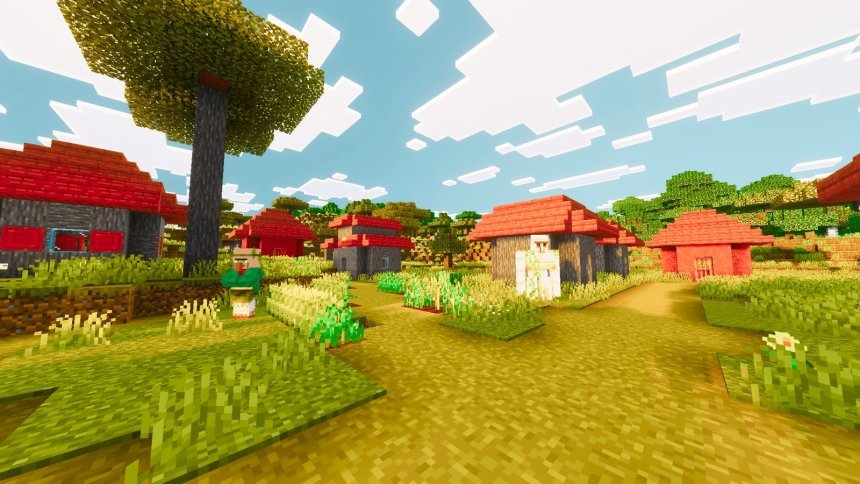
Azure Visuals is a texture pack designed to punch up the colors and clarity of your Minecraft world without requiring shader support. Created by ItzzMikey, it works by increasing saturation across every biome and sharpening terrain detail, making your builds and landscapes pop both in-game and on camera.
If you've felt that vanilla Minecraft looks a bit washed out, or you're recording content and want visuals that grab attention in thumbnails and clips, this pack is worth a test run. It's especially useful for players on mobile devices or lower-end hardware where traditional shaders aren't an option.
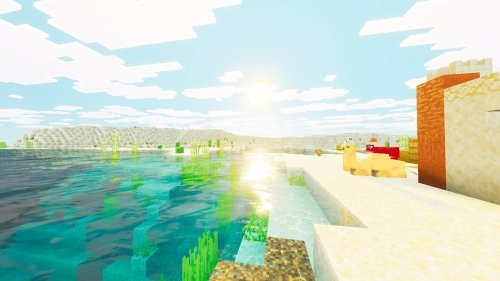
Photos by ItzzMikey
What Azure Visuals actually changes
The pack works by adjusting texture colors rather than adding new models or blocks. Grass becomes a richer green. Foliage gains depth and saturation. The sky deepens into a fuller blue instead of the pale default tone. Clouds become more defined and easier to spot against the sky.
Trees benefit from sharper texture work, making wood grain and leaves read better at distance. Terrain blocks across all biomes look crisper overall. The goal here is clarity and color, not a total visual overhaul. You're still playing vanilla Minecraft, just one that doesn't look washed out.
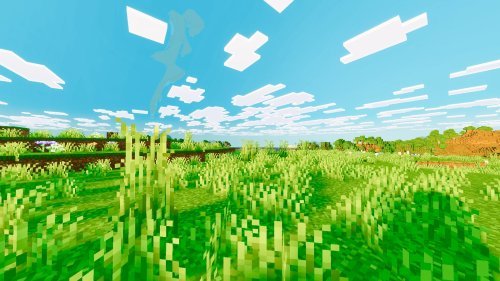
Performance stays solid with Azure Visuals
A common worry with texture packs is frame rate loss, especially on MCPE devices where horsepower is limited. This pack is built to avoid that problem. The saturation and sharpening happen through smart texture work, not heavy rendering tricks. You should see no meaningful FPS drop across render distances.
Testing on mid-range Android phones and older tablets showed stable performance. That's by design. ItzzMikey optimized the pack to look better without making your device work harder.

Who this pack fits best
Streamers and video creators get the most out of Azure Visuals. Colors that pop on screen translate to better viewer engagement. A Minecraft let's play in muted vanilla tones loses attention fast. Azure Visuals gives you that visual punch without needing to learn complex shader software.
Screenshot enthusiasts also benefit. Building something cool and want it to look its best for your portfolio or social media? The color boost and clarity make details read better in still images.
Solo builders who just want their world to feel less flat will like it too. The increased saturation makes biomes feel more distinct from each other. A forest looks more like a forest. A desert feels hotter and drier.

Feature breakdown
- Saturation increase across all biomes for richer color depth
- Enhanced green tones in grass and foliage
- Improved blue rendering in sky and water
- Sharper cloud definition and visibility
- Terrain and tree textures with improved clarity
- Better visual sharpness at all render distances
- No performance compromise on Bedrock Edition or MCPE
How to install Azure Visuals
The pack comes as an .mcpack file. On Bedrock Edition, download the file and open it directly. Your game will prompt you to import it into your resource packs folder. Once activated in world settings, it applies immediately.
On MCPE, the process is the same. Locate the downloaded pack, tap it, and Minecraft handles the rest. No manual folder navigation needed. You can toggle it on or off anytime from your world's resource pack menu.
If you're switching from another texture pack, Azure Visuals layers on top without conflict. Some packs change block models or add new items, which can clash. This one only modifies colors and texture detail, so compatibility issues are rare.
Frequently asked questions
Does Azure Visuals work on all Bedrock devices?
Yes. It's designed for Minecraft Bedrock Edition and MCPE across Windows, console, mobile, and tablets. As long as your device runs current Bedrock, the pack will work.
How does this compare to using shaders?
Shaders add lighting effects, shadows, and dynamic water. Azure Visuals only changes colors and clarity. Shaders look more dramatic but cost FPS. This pack is lighter and works everywhere shaders don't.
Will Azure Visuals make my world look too bright or unrealistic?
The saturation boost is intentional and bold, but not cartoonish. Greens and blues are richer, not neon. If you prefer a more subtle visual change, this pack might feel too aggressive. Test it in a creative world first.
Can I use Azure Visuals with other texture packs?
You can stack packs in your resource pack order. If another pack modifies the same textures, the top pack in the list wins. For best results, keep Azure Visuals either on top or alone.
Share
What's Your Reaction?
 Like
0
Like
0
 Dislike
0
Dislike
0
 Love
0
Love
0
 Funny
0
Funny
0
 Angry
0
Angry
0
 Sad
0
Sad
0
 Wow
0
Wow
0