Better Creeper Animations for Minecraft Bedrock
Better Creeper Animations texture pack adds fluid movement and biome-specific variants to creepers in Minecraft Bedrock Edition. Download the .mcpack file to enhance mob visuals.

Created by CraftStudio
Better Creeper Animations is a texture pack for Minecraft Bedrock that overhauls how creepers move and look across different biomes. Instead of the blocky, static animations vanilla creepers use, this pack adds fluid movement sequences and environment-specific visual variants that make these mobs feel more alive.
If you've played Bedrock Edition long enough, you know creepers can feel a bit stiff. Their animations are minimal, their appearance never changes, and they don't feel quite as threatening as they should. This texture pack fixes that with dozens of new animations and three biome-specific creeper variants that match their surroundings.

Photos by CraftStudio
What's actually different about the animations
The vanilla creeper has maybe four or five animation states. This pack replaces that with something much more detailed. When a creeper is just hanging around, it gently sways instead of standing perfectly still. When it walks toward you, its legs move in response to its speed, so a slow approach looks different from an aggressive chase.
The swimming animation adds paddling motions when creepers enter water, which is oddly satisfying to watch. Jump sequences now use three separate stages: the crouch before launch, the airborne arc, and a distinct landing impact. The most noticeable change is the swelling animation before explosion. Instead of just growing bigger, the creeper's body inflates and trembles, building tension right up until detonation.
When a creeper takes damage, it now flinches visibly. The death animation is also new, replacing the instant vanish with an actual falling sequence so explosions feel more consequential.

Biome-specific creeper variants explained
The pack includes three environment-specific variants, each designed to fit its biome's theme rather than standing out.
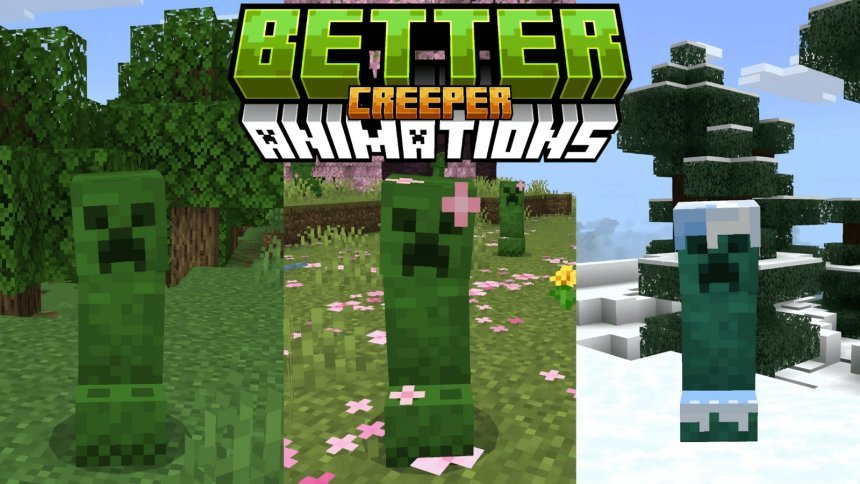
In cherry groves, creepers wear pink cherry blossom petal decorations across their heads and body. It's a nice detail that ties the mob into the biome's aesthetic without looking silly. For snowy biomes like taiga, ice plains, frozen peaks, and snowy slopes, creepers get a snow cap headpiece and slightly lighter coloring. The pale garden variant is probably the most atmospheric: creepers in this biome turn ash-gray with glowing eyes that match the pale garden's eerie feel.
Anywhere else, creepers keep their default green appearance, so you're not forced into a visual theme that doesn't fit.

How to install Better Creeper Animations for Bedrock
Installation is straightforward and takes about two minutes.
- Download the .mcpack file
- Double-click the file to import it into Minecraft Bedrock
- Open Minecraft and navigate to world settings
- Enable the resource pack in the active world settings
- Start a new world or reload your existing one to see the changes
The pack doesn't conflict with other texture packs, though stacking multiple animation-heavy packs might affect performance on lower-end devices. On modern phones and tablets, you shouldn't notice any FPS drop.

Who should actually use this pack
If you play on Bedrock Edition regularly and want mobs to feel more dynamic, this pack is worth trying. It's especially useful for players building in specific biomes, since the variants help creepers blend in rather than look out of place. Survival players might also appreciate the more expressive damage and death animations, which add clarity during combat.
The pack doesn't change creeper behavior, damage values, or explosion mechanics. It's purely visual, so vanilla survival difficulty is unaffected. You can use it in existing worlds without starting fresh, and it works across all Bedrock devices (phones, tablets, Windows 10/11, Xbox, Switch).
Performance on different devices
Animation packs are lighter than shader packs, so performance impact is minimal. On phones from the last few years, you won't see a noticeable FPS drop even with render distance set high. Older devices might see a 1-2 FPS reduction if you're in an area with many creepers at once, but it's negligible in most situations.
If you're running multiple resource packs together, this one plays well with others. Just avoid stacking it with other animation packs that also modify creeper behavior, since they'll conflict.
Frequently asked questions
Does this pack work with other texture packs?
Yes, you can stack it with most texture packs. If you're using another pack that modifies creeper textures or animations, load Better Creeper Animations after it in your resource pack list so it takes priority.
Will this slow down my game on Bedrock?
No, animation packs are lightweight. Performance impact is negligible on most devices, even with high render distance. Older phones might see a 1-2 FPS difference in creeper-heavy areas, but it's usually unnoticeable.
Can I use this pack in existing survival worlds?
Yes, you can enable it in world settings without starting a new world. Just load the pack and reload your existing world to apply the changes.
Does this change how creepers behave or how much damage they do?
No, this is purely visual. Creepers still behave identically and deal the same damage. You're only changing their animations and appearance.
Share
What's Your Reaction?
 Like
0
Like
0
 Dislike
0
Dislike
0
 Love
0
Love
0
 Funny
0
Funny
0
 Angry
0
Angry
0
 Sad
0
Sad
0
 Wow
0
Wow
0