Ultra Vibrant Visuals Texture Pack for Bedrock
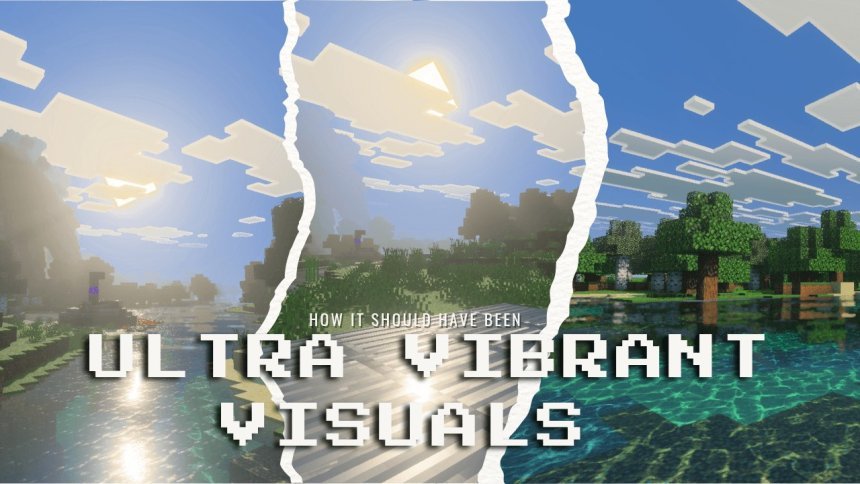
Ultra Vibrant Visuals is a texture pack that overhauls Minecraft Bedrock's graphics with new lighting, colors, and water effects. Works on compatible devices.

Created by Wind's Scion
Ultra Vibrant Visuals is a texture pack for Minecraft Bedrock that rewrites how the game looks. Instead of swapping individual block textures, it targets the core visual systems that control lighting, color, water, and the sky. The result is a version of Minecraft that feels more polished without looking drastically different.
Created by Wind's Scion, this pack takes advantage of Bedrock's Vibrant Visuals graphics feature to apply sweeping changes to atmosphere and rendering. If you've played vanilla Minecraft for years and want the world to feel fresher without installing a full shader suite, this pack does that job.

Photos by Wind's Scion
What makes Ultra Vibrant Visuals different
Most texture packs for MCPE focus on replacing block art or adding new models. Ultra Vibrant Visuals operates differently. It uses the Vibrant Visuals system built into Minecraft Bedrock to adjust how the engine itself displays light, color, and environmental effects. You're looking at changes to the entire visual pipeline, not just prettier stone or smoother wood.
The pack includes a new cubemap, which controls how the sky and distant horizon render. You also get to choose from subpack variants, so you can pick a flavor that matches your taste. One version might lean cooler and more contrasty, while another might be warmer. This customization matters because not every player wants the same color grading.
The specific visual changes you'll see
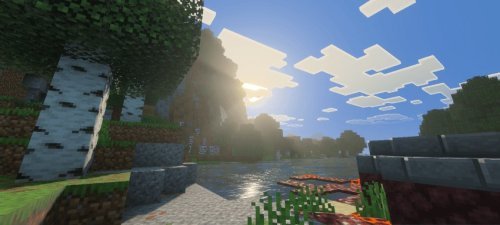
- Shadow rendering with adjusted tones and midtones for smoother light falloff
- Reworked water coloring that looks clearer and more intentional
- Alternative tonemap system that controls how bright colors and dark colors relate to each other
- Updated atmospheric coloring so fog and distant blocks match a unified palette
- Modified night sky coloring that feels less washed-out
- Corrected biome colors so deserts, forests, and oceans each have clearer identities
- Revised sun positioning for better lighting angles
- Default PBR textures that add subtle surface detail without jarring changes
- Water and lightning improvements for more convincing liquids and storms
The tonemap and shadow adjustments are the real backbone here. These aren't visible in a screenshot until you know to look, but they make the world feel refined. Colors don't clip or blow out as easily. Dark caves don't look flat. Water reflects a specific, intentional color instead of just mirroring the sky.

Performance on different devices
Since Ultra Vibrant Visuals uses Bedrock's built-in Vibrant Visuals feature rather than pixel shaders, it's more efficient than traditional shader packs. You're adjusting parameters that Bedrock already supports instead of running custom rendering code on every frame.
That said, your device must support the Vibrant Visuals feature. Most phones and tablets made in the last 4-5 years support it, as well as modern consoles and PC Bedrock. If you have an older Android device or a lower-end iPad, you may hit a wall. The good news is that importing the pack won't crash your game or cause stuttering if your hardware can run Vibrant Visuals at all.

How to install Ultra Vibrant Visuals on MCPE or console
Installing a texture pack in Minecraft Bedrock is straightforward. First, download the Ultra Vibrant Visuals pack file. It comes as an .mcpack file, which Bedrock recognizes natively.
On most devices, double-tapping the .mcpack file opens a prompt asking if you want to import it into Minecraft. Confirm, and the pack moves into your resource packs folder. Open Minecraft, go to Settings, then Resource Packs, and you'll see Ultra Vibrant Visuals in your list. Activate it by moving it to the right-hand column.
After that, go to Video Settings and select the Vibrant Visuals graphics option. The changes take effect immediately. You'll see the new colors and lighting the next time you load a world.
If you want to try different subpack variants, you can download alternate versions and swap them. Minecraft lets you stack multiple packs, so you could layer Ultra Vibrant Visuals with a block texture pack if you wanted both visual overhauls and new block art at once.
Who should try this pack
Ultra Vibrant Visuals makes sense if you're bored with Minecraft's default color palette but not ready to install heavy shader mods. Shader packs on Bedrock are limited and often drain battery life on mobile. This pack gives you a visual refresh that feels official, like a graphics update from Mojang itself.
It's also good for players who use other texture packs. Because Ultra Vibrant Visuals operates at the lighting and color level rather than replacing block textures, you can layer it with your favorite block pack. If you love a specific stone or dirt texture, you don't have to abandon it to get better lighting.
Builders and survival players both benefit. Builders see their creations in a more flattering light. Survival players get a fresher, more atmospheric world to explore without the lag that comes with shader packs.
Common questions about Ultra Vibrant Visuals
Can I use Ultra Vibrant Visuals if my device doesn't support Vibrant Visuals?
No. The pack requires Vibrant Visuals support to function. If your device doesn't have it, you'll need to upgrade to a newer phone, tablet, or console. Check your device's Minecraft Video Settings first to confirm support.
Does this pack work on Minecraft Java Edition?
No. Ultra Vibrant Visuals is built for Minecraft Bedrock and MCPE only. Java Edition uses a different graphics system and doesn't support Vibrant Visuals packs. You'd want a shader mod like Optifine or Iris if you're on Java.
Will this pack slow down my game?
If your device already supports Vibrant Visuals, the performance hit is minimal. The pack adjusts existing rendering parameters rather than adding new effects. You might see a small FPS dip on lower-end devices, but nothing dramatic. Test it in a creative world first if you're concerned.
Can I customize the subpack options?
You can choose between the included subpack variants that Wind's Scion provides. Each one has a different color tone and mood. You can't edit them yourself without technical knowledge, but you can mix and match them to find the look you want.
Share
What's Your Reaction?
 Like
0
Like
0
 Dislike
0
Dislike
0
 Love
0
Love
0
 Funny
0
Funny
0
 Angry
0
Angry
0
 Sad
0
Sad
0
 Wow
0
Wow
0