Mob Selector Addon: Control Which Mobs Spawn in Your World
Control mob spawning with Mob Selector, a Minecraft addon that lets world owners toggle specific mob types on or off. Mix peaceful and hostile mobs in one world.


Created by Studio 38
Mob Selector is an addon that puts you in control of which mobs appear in your Minecraft world. Instead of accepting the default mob spawn rules, you can toggle individual mob types on and off whenever you want, all from a simple in-game interface.
Created by Studio 38, this addon solves a problem that many world builders and server owners face: sometimes you want cows but not creepers, or maybe you're running a peaceful-mode world but need to enable specific hostile mobs for a mini-game. Mob Selector makes that possible without forcing you to restart or use command blocks.
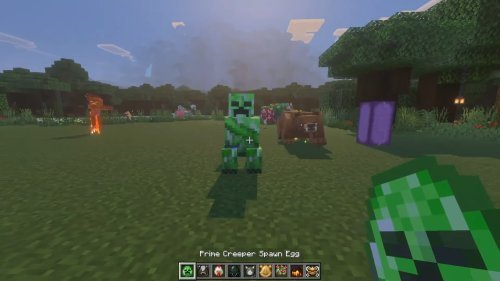
How selective mob spawning works
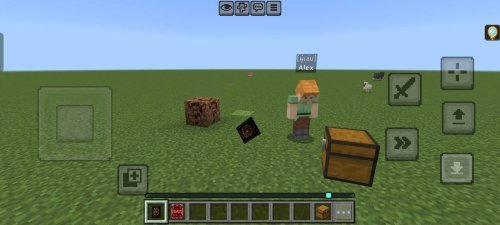
The core feature is straightforward. When the world owner joins a world for the first time with Mob Selector installed, they receive a Mob Selector Book in their inventory. Open it, and you see every mob type in the game listed with toggles. Click the ones you want to allow, and click again to disable them. Changes take effect immediately.
What makes this different from just playing on Peaceful mode is the flexibility. You're not choosing between "all mobs" or "no mobs." You're picking and choosing. Want a world with only passive animals? Turn off all hostile mobs. Running a zombie apocalypse map? Disable everything except undead. Hosting a mini-game that needs specific mobs for a challenge? Enable just those types.
The addon also includes a filter for mob age. You can restrict spawning to baby mobs only or adult mobs only. This opens up specialized building and farming scenarios where age matters.

Features that make mob control practical
- Toggle individual mob types on and off from the Mob Selector Book interface
- Mix peaceful and hostile mob settings in a single world
- Filter mobs by age (babies, adults, or both)
- World owner-only access, so other players can't accidentally disable mobs
- Recoverable interface if you lose the book (sneak and interact with air while holding any book to regenerate it)
- Fully compatible with achievements
- No experimental features required to run

Why this matters for world creators
Mob farms work best when you control mob spawning rates and types. If you're building a mob grinder for experience or drops, you need the right mobs in the right conditions. A mob detection range of 128 blocks triggers spawning, so controlling which mobs are allowed to spawn saves you from unwanted interference.
For adventure maps and custom game modes, selective mob spawning is even more important. If you've designed a haunted house and only want phantoms and cave spiders inside, you don't want a creeper blowing up your architecture. Mob Selector lets you enforce that without command block chains.
Building communities also benefit. Some players like their creative worlds completely quiet. Others want animals for aesthetics but no hostile mobs. Mob Selector respects those preferences in a way that feels less clunky than other workarounds.

What you need to know before installing
The addon doesn't use player.json files, which means it has a lighter footprint than some alternatives. It works on Bedrock Edition and MCPE without requiring any experimental toggles to be enabled. Your world stays compatible with achievements, so you're not locking yourself out of unlocking them.
One practical detail: only the world owner can access the Mob Selector Book interface. If you're running a multiplayer realm or local world with friends, you stay in control of what mobs are allowed. Other players can't alter the settings.
The recovery mechanism is useful too. If you somehow lose the book (dropped it in lava, died and didn't retrieve it), you can regenerate it without resetting the world. Just sneak and interact with air while holding any book, and the Mob Selector Book appears in your inventory.
How to install Mob Selector
Mob Selector comes as an .mcpack file. Download it, then open it with Minecraft. The launcher will prompt you to import it into your world. Select the world you want to apply it to, confirm, and launch. The addon activates immediately.
If you're using Minecraft on mobile, the process is similar. Tap the file, select "Open with Minecraft," and choose your world. Desktop users can double-click the .mcpack file and follow the same flow.
After installing, join your world. You'll receive the Mob Selector Book in your inventory (if you're the world owner). If you're joining an existing world, the book may already be waiting for you in the spawn area or your inventory.
FAQs about mob control in Minecraft
How do mob farms work in Minecraft?
Mob farms rely on natural spawning mechanics. Mobs spawn in dark areas when a player is within detection range. A mob selector addon like this one lets you control which mobs are allowed to spawn, so you can build a farm that produces only the drops you want.
Can you disable specific mobs without using an addon?
You can use commands to kill specific mobs repeatedly, but that's inefficient. Mob Selector is cleaner because it prevents them from spawning in the first place, saving server resources.
Does Mob Selector work on servers and realms?
Yes. The addon works on Bedrock Edition and MCPE, which covers both local multiplayer and Realms. Only the world owner can change the mob settings.
What are the best Minecraft addons for world customization?
Mob Selector is one of the top options for controlling mob spawning. Depending on what else you want to customize, you might pair it with addons that adjust block behavior, add new items, or change world generation.
Share
What's Your Reaction?
 Like
0
Like
0
 Dislike
0
Dislike
0
 Love
0
Love
0
 Funny
0
Funny
0
 Angry
0
Angry
0
 Sad
0
Sad
0
 Wow
0
Wow
0