My Music Player download for Minecraft Bedrock
My Music Player is a Bedrock resource pack that adds a music player to your chat screen. Download for MCPE and play custom .ogg tracks without leaving the game.

Created by AlvEstevann - Creator
My Music Player is a resource pack for Minecraft Bedrock that puts a functioning music player directly into your in-game chat interface. Instead of alt-tabbing or hunting through folders, you can queue up custom audio tracks and play them without ever leaving the game.
Created by AlvEstevann, this pack bridges a gap many players have noticed: there's no built-in way to manage music playback while you're deep in survival mode or working on a build. This pack solves that problem by adding a simple button to your chat screen.
Photos by AlvEstevann - Creator
What my music player download adds to your game
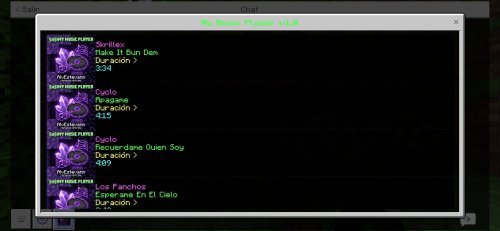
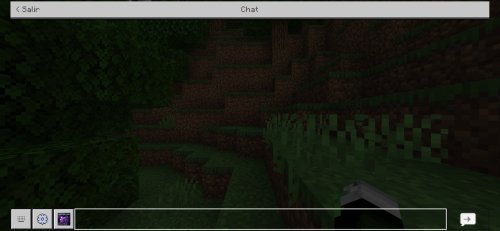
The core feature is dead simple. A music player button appears on your chat interface, accessible whenever you open chat. Tap it, and playback starts. The pack uses a custom purple-themed design that matches most Bedrock UI elements without clashing with your world.
What makes this different from just playing music in the background on your phone or desktop is proximity and control. Your music player lives inside Minecraft. It's one click away, not three apps away.
- Music player button integrated into chat window
- Single-click track activation
- Purple custom user interface theme
- Support for .ogg audio format files
- No need to close or minimize the game to adjust music
How to customize with your own music files
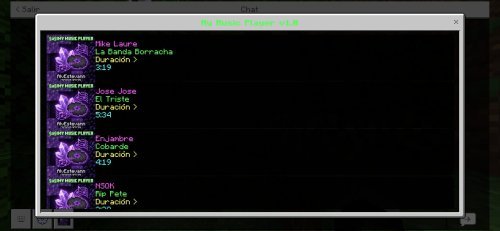
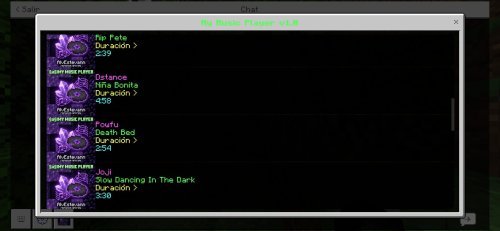
The pack ships ready to use, but the real power comes when you add your own tracks. My Music Player accepts .ogg format audio files, which is a compressed but high-quality format that keeps file sizes reasonable for mobile devices.
After downloading the pack, you'll add your custom .ogg files to the designated music folder within the resource pack directory. When you load a world with the pack active, those tracks become available to play. This means you can build a personalized soundtrack for your Minecraft sessions without touching the game's default music system.
If you're not familiar with .ogg files, they're easy to convert from mp3 using free online tools or desktop software. Many creators provide .ogg versions of their music, or you can grab royalty-free tracks from platforms like YouTube Audio Library or Freepik.
Installation for Minecraft Bedrock and MCPE
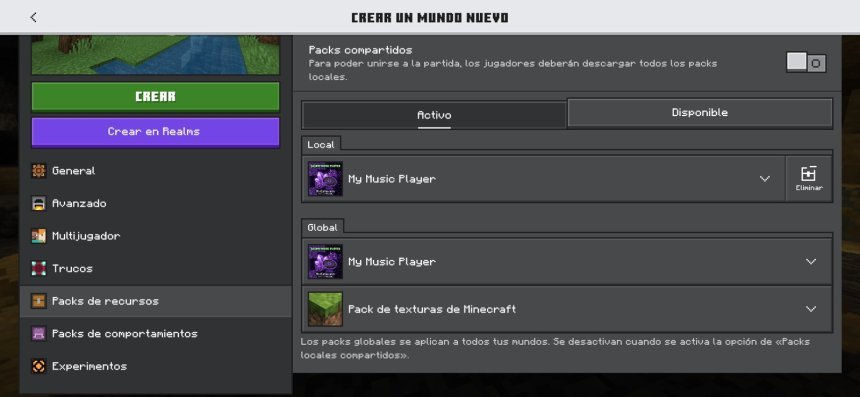
Installing My Music Player follows the standard .mcpack workflow for Bedrock. Download the pack file, open it on your device, and let it import into Minecraft. The game handles the rest, adding it to your resource pack list.
On Android, you may need to allow file access to complete the import. On Windows, iPad, or Nintendo Switch, the process is straightforward from within the game's settings. Once imported, activate it in your world settings before creating or entering a world.
Things to know before you download my music player for mp3 playback
The pack has a couple of limitations worth understanding upfront. Music tracks cannot be paused once they start playing. You can stop one track and start another, but mid-song pause isn't available. This is a technical constraint of how Bedrock handles audio through resource packs.
Also, if you start a new track while another is already playing, both will run at the same time, creating audio overlap. You'll want to finish or stop your current track before selecting a new one. This isn't a bug, just how the pack's design works.
Neither of these is a dealbreaker for casual listening while you mine or build, but they're good to know if you're looking for full playback control.
My music player download for free on different platforms
My Music Player works across all recent versions of Minecraft Bedrock, including Windows 10 and 11, Xbox One, Xbox Series X/S, Nintendo Switch, iOS, and Android devices. As long as your version supports resource packs, the music player will function.
Performance impact is minimal. Since the player only adds a UI button and handles audio through Bedrock's existing systems, it won't cause lag or drain battery faster than normal gameplay. It's lightweight enough for even mid-range phones and older tablets.
FAQs about my music player download and setup
Can I use .mp3 files with my music player download?
No. The pack specifically requires .ogg format files. You'll need to convert any .mp3 tracks to .ogg before adding them to the pack. Free online converters make this simple, typically taking under a minute per file.
How do I pause music while playing?
The pack doesn't support pause functionality. You can start a new track, which stops the current one, or simply close the music player and let it fade. If pause is essential to your workflow, this pack may not be the right fit.
Will my music player work in multiplayer or on servers?
The music player is local to your device and doesn't interact with server-side systems, so it works fine in multiplayer. Other players won't hear your custom music unless they have the pack installed too.
Who created this pack and what should I know about credits?
AlvEstevann created My Music Player. If you feature the pack in videos, streams, or content, the creator requests proper credit and a link to the official download source. This helps keep the community safe from modified or malware-laden versions.
Share
What's Your Reaction?
 Like
0
Like
0
 Dislike
0
Dislike
0
 Love
0
Love
0
 Funny
0
Funny
0
 Angry
0
Angry
0
 Sad
0
Sad
0
 Wow
0
Wow
0