Simple ChestShops: The Best MCPE Addon for Player Shops
Simple ChestShops is a sign-based addon for Minecraft Bedrock that lets players create buy/sell shops linked to chests. Perfect for server economies.

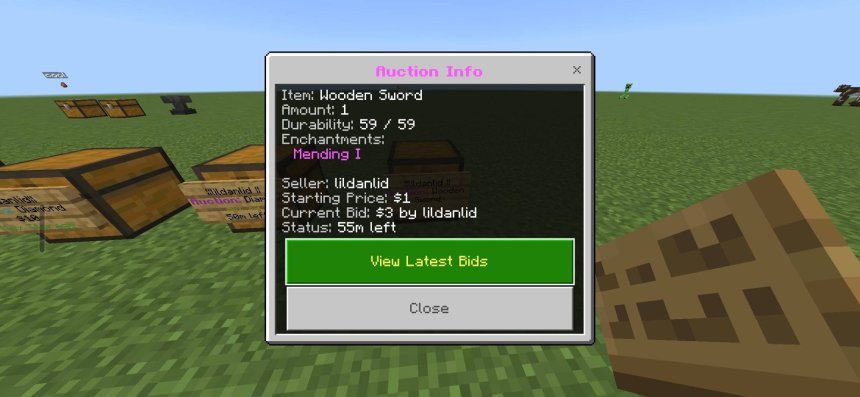
Created by llildanlid
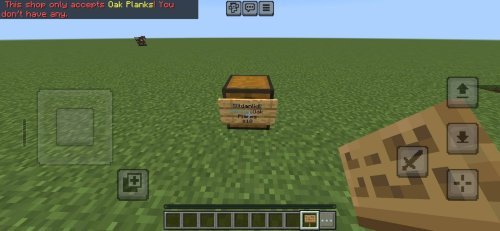
Simple ChestShops is a sign-based addon for Minecraft Bedrock Edition that turns any chest, barrel, or shulker box into a working shop. Players place a sign, link it to nearby storage, set a price, and the shop goes live. It's one of the best Minecraft addons if you're running a server and want to hand over economy management to your players.
The addon works by letting players interact with containers to configure shops, then use sign commands to create buy shops, sell shops, or auctions. Everything is managed through simple prompts. No command syntax to memorize, no complex setup. If you've played on a server with player-driven trading, this addon probably powered it.

Photos by llildanlid
Why this addon matters for Bedrock servers
Most best MCPE addons focus on cosmetics or mobs. Simple ChestShops does something different: it lets your players build the economy themselves. Server owners spend tons of time managing shops, handling trades, or policing scams. This addon offloads all of that.
The protection layer matters here too. Shops and their linked containers are locked to prevent grief or theft. Only the shop owner or admins can break them or modify prices. That's table stakes for any public server, and it's built in.
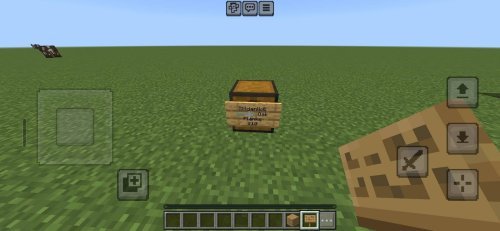
What shops can do in this addon
Simple ChestShops supports three shop types, each with a different purpose:
- Buy shops: Players set a price and sell items from the container to other players. Place diamonds in your chest, set "10 diamonds per stack," and buyers pull from your supply.
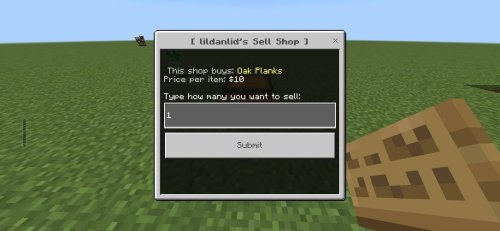
- Sell shops: Players buy items from the container at a price you set. Useful if you want to stock a player store with cheap building blocks or gear.
- Auction shops: Players bid on items instead of paying a fixed price. Good for rare drops or community events.
The container linking is the backbone. Shops only work if there's a chest, barrel, or shulker box within 1 block of the sign. Items for sale sit in the first slot of the linked container. When someone buys from your shop, the item leaves that container and the currency arrives in a separate slot.
Currency and admin controls
Server owners get full control over what counts as currency. You could use emeralds, diamonds, or a custom item. The currency system is configurable, so you're not locked into one choice.
Admin tools include a currency distribution system for setting up new players with starting funds, shop limits so the economy doesn't explode, and oversight options for monitoring the market. If someone's price gouging or breaking terms, admins can remove or edit their shops.
The offline sales feature is worth mentioning. Shops keep working even when the owner is offline. Your sell shop keeps selling, buy shop keeps buying. The currency and items stack up in the container until you log back in. That's how real player economies function on active servers.
Performance on different devices
Sign-based systems are light on performance. Unlike mob addons or particle effects, Simple ChestShops runs on command chains and container logic. Even on older phones or tablets, you won't see FPS drops from having multiple shops on your server. The addon scales well from 2 players to 20+.
Container interactions are instant. No lag between clicking a sign and the shop opening. Transactions process quickly too, so trading never feels clunky.
How to install Simple ChestShops
Download the addon as a .mcpack file. Open it on your device, and Minecraft will recognize it as a Bedrock addon. The game will ask you which world or realm you want to apply it to. Select your server world, and the addon activates immediately.
Server owners should configure settings before players start building shops. Set your currency item, shop limits, and admin permissions in the addon's config menu. Once that's done, players can place signs and start trading.
FAQ: Simple ChestShops for Bedrock servers
Can I use this addon on a realm?
Yes. Realms support Bedrock addons, including sign-based economy systems. Install it to your realm through the world settings menu, and all players will see it automatically.
What happens if someone breaks a shop sign?
Only the shop owner or admins can destroy signs. The protection system prevents other players from griefing shops, so stealing items or closing a rival's store isn't possible.
Is Simple ChestShops one of the best MCPE addons for solo play?
It works in single-player, but it's built for multiplayer. The real value shows up on servers where you want players to trade with each other. In a single-player world, there's not much point since you control everything anyway.
Can players create unlimited shops?
No. Server admins set shop limits per player to prevent market flooding. Default limits are usually between 5 and 10 shops per person, but you control that number.
Share
What's Your Reaction?
 Like
0
Like
0
 Dislike
0
Dislike
0
 Love
0
Love
0
 Funny
0
Funny
0
 Angry
0
Angry
0
 Sad
0
Sad
0
 Wow
0
Wow
0