UtilityAdventure: Best Minecraft Addons for Fluid Storage
UtilityAdventure addon adds utility items like stackable fluid cells and builder wands to Minecraft Bedrock. Read our hands-on review of this MCPE addon.

Created by Block Dev
UtilityAdventure is a utility addon for Minecraft Bedrock and MCPE that fills a gap in vanilla gameplay by introducing specialized containers and tools designed to make resource management less tedious. If you've ever wished you could stack filled buckets in your inventory or had dedicated wands to speed up construction, this addon for Minecraft tries to solve both problems at once.
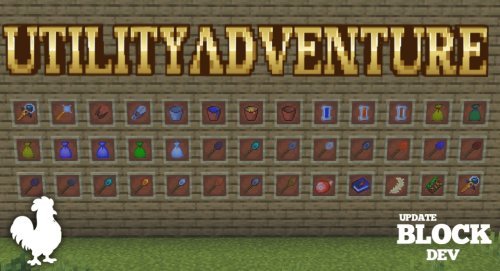
What makes this one of the best minecraft addons for utility players
The core idea behind UtilityAdventure is straightforward: instead of settling for vanilla buckets that take up a full inventory slot each, you get access to items that actually stack when filled. That single change removes a common pain point that most players don't even realize bothers them until they're using stackable containers.
Beyond fluid storage, the addon rounds out your toolkit with construction helpers and item collection features. It's not trying to overhaul your game or add new dimensions. It's trying to make the routine tasks you do every day slightly faster and less annoying. That's where quality-of-life addons for Minecraft Bedrock live, and UtilityAdventure commits to that space.
Key features in UtilityAdventure
- Cell containers that store and transport liquids like water and lava, and stack in your inventory when full
- Empty Cell fluid container that works like a bucket but with inventory space efficiency
- Builder wands to speed up block placement during construction projects
- Loot Bags that collect and organize items you pick up
- Clay Bucket as an alternative container material option
- Clay Shears tool for harvesting
- Light Wand for quickly adding light sources without placing individual blocks
- Support for additional items in planned future updates
The stackable cell difference
Here's what separates UtilityAdventure from just using vanilla buckets: stacking. When you fill a regular bucket with water or lava in survival mode, it takes up one slot. Fill ten buckets and you've lost ten inventory spaces. The Cell containers in this addon flip that design. A filled Cell still counts as a single inventory item, so you can carry multiple filled cells in the same slot.
This matters most when you're doing builds that need a lot of water or lava, or when you're traveling between water sources and your project site. Early-game players moving lava around for furnaces notice it immediately. Late-game builders working on detailed terraforming feel the difference just as much.

Builder wands and construction tools
The builder wands in this addon aren't going to place blocks for you automatically, but they're designed to make manual placement faster and more convenient. If you've spent hours filling in terrain or creating walls, you know that clicking one block at a time gets old. These tools aim to cut down on repetitive clicking.
The Light Wand follows the same philosophy. Instead of crafting torches, walking around placing them one by one, you get a dedicated tool that handles lighting faster. It won't turn you into a creative-mode player, but it removes friction from tasks you do routinely in survival.
Who should try this MCPE addon
If you're someone who builds regularly or spends time managing inventories, UtilityAdventure was made for you. Builders get the most direct value from the construction-focused items. Survival players who run between water sources, farms, and builds benefit from stackable fluid storage. Even casual explorers will appreciate loot bags if they do a lot of mining or spelunking.
You don't need to be a hardcore player to enjoy this addon. The tools here are convenient, not overpowered. You're not getting items that make the game easier in a gamebreaking way, just items that respect your inventory space and time a bit more.
How to install UtilityAdventure on Minecraft Bedrock
UtilityAdventure requires two dependencies before it works. You'll need to download and install both UtilityCraft and Dorios RPG Core v2 first. Once those are in place, you can add UtilityAdventure itself.
Installation on Bedrock follows the standard .mcpack file process. Download the pack file, open it on your device, and Minecraft will prompt you to add it to your world. Make sure all three addons are activated in your world settings before creating or loading a world. The addon is compatible with both creative and survival modes.
If you run into problems or have questions about setup, Block Dev (the original creator) hosts a Discord server where the community shares support and feedback.
Common questions about this minecraft addon
Do I need all the dependencies to use UtilityAdventure?
Yes. UtilityCraft and Dorios RPG Core v2 are required for this addon to function. Download and install all three before loading your world.
Can I use this addon in survival mode?
Absolutely. UtilityAdventure works in both survival and creative modes. Most of the utility items are actually designed with survival players in mind.
Will this addon work on older Minecraft versions?
UtilityAdventure is built for current Minecraft Bedrock versions. Check the creator's Discord or the addon page to confirm compatibility with your specific version before installing.
What are the best minecraft addons for storage besides this one?
UtilityAdventure covers storage well, but if you want even more container options or inventory management features, explore other quality-of-life addons in the Minecraft community. Many storage-focused packs work alongside utility addons.
Share
What's Your Reaction?
 Like
0
Like
0
 Dislike
0
Dislike
0
 Love
0
Love
0
 Funny
0
Funny
0
 Angry
0
Angry
0
 Sad
0
Sad
0
 Wow
0
Wow
0