Best Minecraft addons 2026: VenFlow mining modes guide
VenFlow adds 45+ mining modes to Minecraft Bedrock with vein mining, tree felling, and ore excavation. Customizable overlays and automation features for MCPE.


Created by ToanCao
VenFlow is a mining automation addon for Minecraft Bedrock that replaces the tedious block-by-block grind with configurable mining modes and visual overlays. Created by ToanCao, it's one of the best Minecraft addons 2026 if you spend half your playtime in caves or strip mining.
The addon gives you control over how you harvest blocks. Instead of clicking each ore individually, you point your pickaxe at a vein and watch it disappear. Swap to an axe for trees, a hoe for crops, and VenFlow handles the repetitive work while you stay focused on exploration and building.

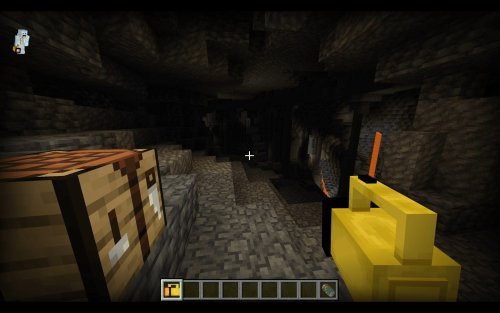
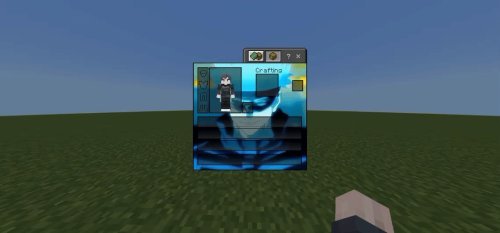
Photos by ToanCao
What VenFlow actually does for your mining
VenFlow works by detecting your tool choice and mining gesture, then applying one of 45+ mining patterns to nearby blocks. Activate the menu by double-jumping, sneaking, stopping sneaks, holding your tool, and stepping backward within 3 seconds. Alternatively, rename any tool to "VenFlow" or "Quick" and shift/right-click to open settings instantly.
Once inside, you pick a mode and adjust settings. The addon then scans blocks around your crosshair in real time, showing exactly which blocks will break before you commit. An action bar displays the count and distance as you prepare each swing.
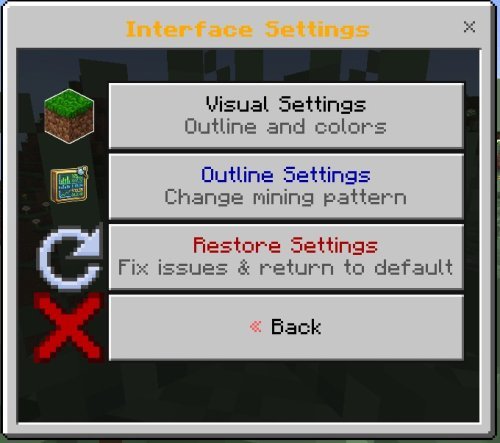
The 45+ mining modes explained
VenFlow has multiple ways to mine. The addon organizes its modes into seven categories:
- Standard face/edge/corner variants for vein mining in different directions and scales
- Tunneling patterns that strip out 1x1, 2x2, or wider channels as you walk forward
- Excavation sizes ranging from small pockets to massive 5x5 blocks
- Geometric shapes like spheres, cubes, and pyramids for creative mining
- Advanced patterns that mix direction and scale for specialized tasks
- Vertical operations for mining straight up or down without moving
- Structure mining to target specific block types across large areas
You pick one mode per tool session. Change your mind, jump back into the menu, and switch to a different pattern in seconds. This flexibility means you're never locked into a single mining style.
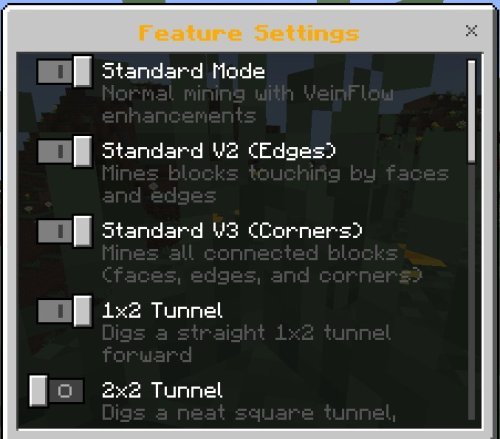
Visual feedback and customization options
Seeing which blocks will break before they break helps keep you safe. VenFlow renders a colored outline around target blocks in four visual styles: wireframe for clarity, scan dots for minimalism, bold frame for visibility, and minimal corners for low-overhead gaming.
You can choose from 16 outline colors, including a dynamic rainbow mode that cycles through hues as you move. Changing outline style affects how quickly your device processes the preview. Lower-end phones might prefer "minimal corners" while high-end tablets can handle "bold frame" without stuttering.
Real-time feedback in the action bar shows your block count and scan distance as you target blocks. This helps you predict fatigue and avoid surprises when your hunger meter dips.
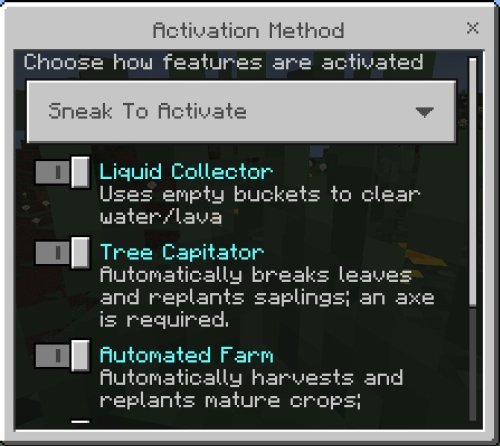
Automation features beyond mining
VenFlow breaks blocks in patterns and includes a suite of automation helpers that cut down busywork across multiple tasks:
- Tree felling with automatic leaf clearing and sapling replanting in one swing
- Crop harvesting and replanting for fully grown crops, saving multiple returns to the same farm
- Liquid collection using empty buckets to grab water or lava sources directly
- Sword sweep vein mining to activate the addon with sword sweep attacks
- Automatic torch placement during tunneling so you never get lost in the dark
- Soil tilling and path creation with hoe and shovel using pattern-based application
- Liquid detection and blocking to prevent water or lava from ruining your tunnel
- Double door automation for opening and closing adjacent doors without manual interaction
Each automation respects your tool tier and durability. If your pickaxe has 5 durability left and you target 20 blocks, the addon stops before your tool breaks and auto-switches to the next pickaxe in your hotbar if available.
Safety features and performance considerations
VenFlow includes multiple safety nets to keep you from wasting tools or starving mid-tunnel. The addon checks your hunger level before starting, verifies tool durability won't run out, and prevents activation unless you're holding the right tool tier.
Sneaking is always required to operate the addon, and standing up stops everything instantly. This means accidental pickaxe swings won't trigger unwanted mining. You also set your own scan range and break delay, letting you balance speed against lag on your device.
The addon runs garbage collection to free memory after large mining operations, keeping frame rates stable on Bedrock Edition devices. Older phones or tablets running MCPE may see minor slowdown with larger excavation sizes, but toggling to smaller patterns restores smooth gameplay immediately.
What mining changes look like in practice
Here's a typical session. You spawn into your world and walk to an iron vein deep underground. Open VenFlow, select "Vein Mining" mode, and point at the ore. The addon outlines 15 connected iron blocks in your chosen color. Hold your pickaxe, sneak, stop sneaking, step backward, and release. All 15 blocks break instantly while you stay in place. No walking between blocks. No click spam.
That same axe swap lets you fell a tall oak tree. VenFlow mines the trunk, clears leaves, and replants saplings automatically. You go from chopping trees for 10 minutes to clearing a forest in 2.
Crop farms work similarly. Point at wheat, activate harvest mode, and every fully grown crop breaks and replants in seconds. Partially grown crops stay untouched.
For strip mining, select a tunneling mode that digs a 2-high, 3-wide channel ahead of you. Walk forward while the addon breaks blocks in your path, torch placement handles visibility, and liquid detection pauses the addon if water appears. You mine hands-free while staying alert for caves.
Compatibility and language support
VenFlow runs on Minecraft Bedrock versions including 1.12.30, 1.12.114, and 1.21.44, covering most current MCPE installations. The addon is achievement-friendly, meaning your world won't become ineligible for unlocking advancements if you use it.
ToanCao included 15 language translations: Vietnamese, English, Chinese, Japanese, Korean, French, German, Italian, Spanish, Portuguese, Russian, Turkish, Polish, Thai, and Indonesian. The menu switches to your device language automatically.
The addon uses a custom entity-based rendering system for block outlines instead of relying on shader-based overlays. This approach works on devices without shader support and avoids conflicts with cosmetic texture packs.
Settings you'll actually adjust
VenFlow includes several sliders and toggles worth tweaking based on your playstyle. You can set maximum block count per action to prevent lag (useful on weaker devices), adjust scan range to detect blocks further or closer to your crosshair, set break delay to speed up or slow down mining, and configure your outline color and style.
Block filters let you whitelist which ore types, logs, stone variants, and shovel blocks the addon targets. This prevents accidentally mining wooden blocks when you mean to mine stone, or clearing diamonds when you're only after copper.
Exhaustion (hunger drain rate) is configurable too, so you can make mining less punishing or more challenging depending on your hunger mechanics preferences.
Who should use this addon
If you play vanilla Bedrock Edition and feel like mining is slower than building, VenFlow cuts that grind significantly. Survival players benefit most, especially those running long-term worlds where you return to caves repeatedly. Creative players can use geometric mining modes to sculpt terrain or hollow out mountains without brush tools.
Players on lower-end devices can disable visual effects to improve performance, while players on flagship tablets can max out visual settings and still maintain 60 FPS. The addon scales to your hardware.
Frequently asked questions
How do I open the VenFlow menu?
Double-jump, sneak, stop sneaking, hold a pickaxe/axe/shovel/hoe, and step backward 0.8+ blocks within 3 seconds. Or rename any tool to "VenFlow" and shift/right-click. Book named "VenFlow" also works.
Does VenFlow work on servers or multiplayer?
VenFlow is a client-side addon, so it only works in your own world or on servers that allow behavior addons. Check your server's addon policy before uploading.
What's the difference between the mining modes?
Vein modes break connected blocks of the same type. Tunnel modes break blocks in a line or channel ahead of you. Excavation modes break blocks in a cube or sphere. Geometric modes let you mine spheres, pyramids, and custom shapes. Vertical modes mine straight up or down.
Will this addon make my world lose achievements?
No. VenFlow is achievement-friendly and won't disable advancements in Bedrock Edition worlds.
Share
What's Your Reaction?
 Like
0
Like
0
 Dislike
0
Dislike
0
 Love
0
Love
0
 Funny
0
Funny
0
 Angry
0
Angry
0
 Sad
0
Sad
0
 Wow
0
Wow
0