Best Minecraft Addons 2026: Auction House Economy System
Verocrft's Auction House addon adds a full economy system to MCPE. List items, bid in real-time, and manage trades with a custom currency—no experimental toggles needed.


Created by Verocrft
Verocrft's Auction House is a Bedrock Edition addon that transforms how players trade items. It adds a full auction system where you can list inventory items for sale, place bids on other listings, and manage a personal claim box for unclaimed rewards. The whole thing runs on a configurable currency system without requiring experimental toggles.
If your server or realm needs an economy layer, this addon works well for survival servers, multiplayer worlds, and any setup where players need a fair way to exchange valuable items without direct hand-to-hand trading.

Photos by Verocrft
How the auction house works in Minecraft Bedrock
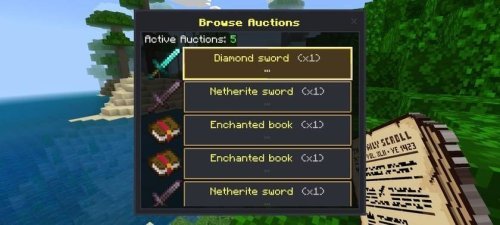
The system is straightforward: you grab the Auction Ledger (given to new players on first join), hold it, and right-click to open the interface. From there, you can browse active auctions, place bids, or list your own items.
When you list something, you set a starting price and how long the auction runs. Other players see it in real-time and can bid against each other. If someone outbids you, your coins go straight back into your account. If you're offline when an auction ends or someone bids, unclaimed rewards sit in your Claim Box until you log back in and collect them.
Sales tax gets deducted from the final sale price, which you can adjust in the config (default is 5%). There's no upfront fee to list an item, so listing is free. You only lose money on the tax when something actually sells.
What makes this one of the best addons for MCPE economies
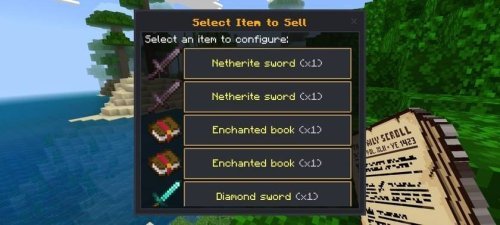
The medieval GUI fits survival worlds. It uses slate and charcoal tones with gold trim, so it doesn't look out of place if your server leans fantasy or vanilla-plus. The visual design matters less than what it does, though.
Real-time bidding works with enforced minimum bid increments, which stops lowball bids and keeps things fair. You can't win an auction by offering 1 coin more than the previous bid. The system enforces sensible bid jumps instead. This prevents annoying micro-bidding wars and keeps the economy honest.
Item whitelisting prevents players from flooding the market with farmable trash. By default, only high-value, non-farmable items can be listed. You control what's sellable by editing the whitelist in the config file, or you can bulk-add items from other addons using namespace prefixes if you're comfortable editing code.
Technical features that matter for server stability
- Item properties (enchantments, durability, lore, custom names) are serialized to prevent duplication exploits
- Automatic texture resolution handles custom items from other addons without conflicts
- Full localization support for English and Indonesian text
- Audio feedback confirms successful bids and errors so players know what happened
- Achievements stay enabled, no experimental toggles needed
- Currency name is customizable in config (default is Ducats)
- Minimum listing price defaults to 50 coins but adjusts in config
The addon uses scoreboard objectives behind the scenes, which means it integrates cleanly with other server systems. If you're running companion addons for RPGs or dynamic economies, this plays well with them.

Customizing the auction house for your world
Open the config file at Auction_House_BP/scripts/config.js and you can adjust almost everything: the currency name, tax rate, minimum listing price, which items can be sold, and the scoreboard objective it uses.
Language files live in Auction_House_BP/texts/ (behavior) and Auction_House_RP/texts/ (resource). If you want to rename the Auction Ledger or change UI text, those are editable too. This is helpful if you're running a non-English server or want terminology to match your world's theme.
The whitelist is the main thing most servers tweak. By default it blocks most common blocks and mobs, allowing only rare or crafted items. You can specify individual items or use namespace prefixes to whitelist entire addon item collections at once.
How to install this addon for Minecraft Bedrock
Download the .mcaddon file and double-click it. Minecraft opens and asks if you want to import the packs. Click yes. Both the Behavior Pack and Resource Pack import together.
Launch a world or realm, go to World Settings, scroll down to Resource Packs and Behavior Packs, and enable both packs (order doesn't matter). You'll see them move to the active list.
Once active, the addon is ready. New players get an Auction Ledger in their inventory. To open the auction house, hold the Ledger and right-click, or type /scriptevent auction:open in chat. The interface loads immediately.
Common questions about the auction house addon
What are the best minecraft addons for multiplayer economies?
This one covers auctions, but works best paired with other addons that handle currency generation, shops, or jobs. The auction house itself is the secondary economy layer, something to do with coins you earn elsewhere.
Can I customize the currency name and tax rate?
Yes. Edit the config.js file in the Behavior Pack. You can change the currency name, tax percentage, minimum bid increments, listing durations, and even which items are whitelistable.
What happens to my bid if I get outbid?
It's refunded automatically. If you're online, the coins go straight back to your account. If you're offline, they sit in your Claim Box until you log in and collect them.
Does this work with other addons?
Yes. It handles custom items from other addons and can whitelist them by namespace. Achievements stay on without experimental toggles, so it's stable alongside most building, mob, or cosmetic addons.
Share
What's Your Reaction?
 Like
0
Like
0
 Dislike
0
Dislike
0
 Love
0
Love
0
 Funny
0
Funny
0
 Angry
0
Angry
0
 Sad
0
Sad
0
 Wow
0
Wow
0