Best shaders for Minecraft PE 2026: BSLB Classic V3 review
BSLB Classic V3 is a Bedrock shader pack with realistic lighting and warm colors. Learn if this BSL port works for MCPE and how to install it.

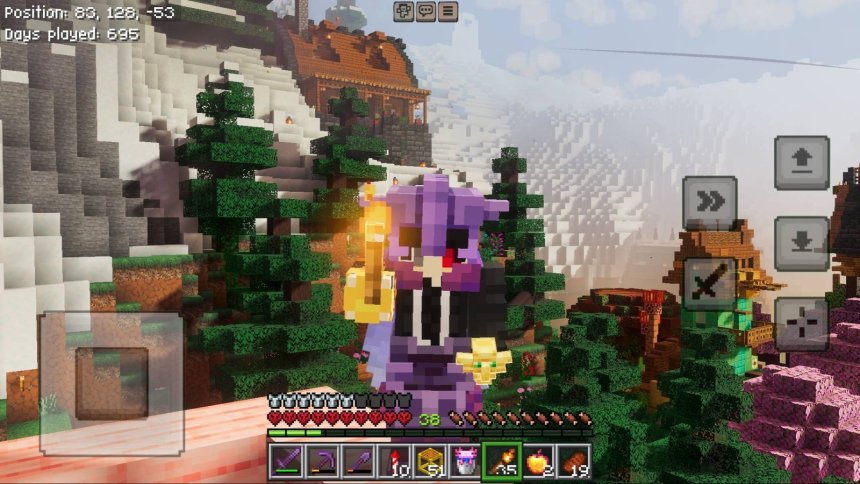
Created by HoneyStudios
BSLB Shaders Bedrock Classic V3 is a shader pack that brings the beloved BSL shader experience to Minecraft Bedrock and mobile. If you've wanted realistic lighting and warm atmospheric effects on your phone or tablet, this is the port you've been waiting for.
This pack transforms how light bounces around your world and adjusts color rendering to feel more natural. It's made by HoneyStudios and is one of the more complete attempts to replicate desktop shader quality on Bedrock Edition.
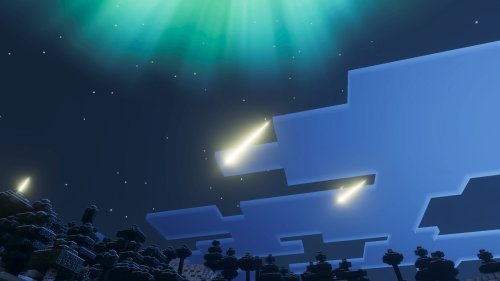
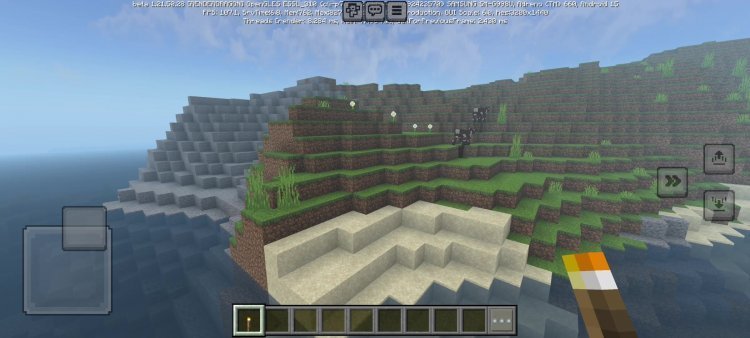
Photos by HoneyStudios
What makes BSLB Classic V3 different from other MCPE shaders
Most shader packs for mobile either go ultra-minimal or drain your battery. BSLB tries to find the middle ground. It doesn't turn your world into a photorealistic render, but it does make sunsets warmer, shadows softer, and the overall mood of the game noticeably different from vanilla.
The key difference is that this is a faithful port of BSL Shaders, which has been popular on Java Edition for years. That means the visual direction is proven. HoneyStudios didn't invent the look from scratch; they adapted what works.
You'll notice the effects most at golden hour. Sunlight takes on an orange-gold tint. Shadows develop color instead of turning everything dark blue. Water and transparent blocks get better color depth.
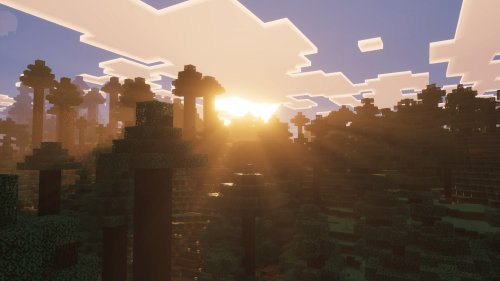
Best shaders for realistic Minecraft Bedrock visuals: what BSLB does well
If you're hunting for the best looking shaders for Minecraft PE, realism matters more than visual noise. BSLB focuses on a specific type of realism: warm, natural lighting that doesn't scream "shader pack."
Here's what actually changes when you load it:
- Lighting gets a directional quality. Light no longer fills every corner equally. Your torch has a falloff. The sun casts actual shadows with soft edges.
- Cloud rendering improves. They no longer look like flat white slabs. They have shape and receive shading from the sun and sky.
- Color rendering shifts the entire palette slightly warmer. Grass stays green but leans toward olive. Stone gets subtle warmth. Snow reads as cream instead of pure white.
- Skin tones and wood blocks benefit most. Humans and animals look less washed out. Oak planks feel like oak instead of beige.
The pack is optimized for devices using Vibrant Visuals rendering mode, so if your device supports that, you'll get the intended look. On older hardware, you can still run it, but the effect will be more muted.

Compatibility and installation: working with texture packs
BSLB Classic V3 works best when paired with Actions & Stuff texture pack. It's not a hard requirement, but the two were tuned together. The shader expects certain color values from that pack and adjusts lighting around them.
If you use a different texture pack, BSLB will still work. Colors just might not read the way HoneyStudios intended. Think of it like pairing wine with food: it's drinkable on its own, but the match matters.
Can you get shaders on Minecraft PE? How to install BSLB
Yes, you can. Bedrock shaders come as .mcpack files, which your device recognizes and imports automatically.
To install BSLB Classic V3:
- Download the shader pack .mcpack file.
- Open it. Your device will ask which app to use. Choose Minecraft.
- Minecraft will import it into your resource packs folder.
- Launch a world and go to Settings > Resource Packs.
- Activate the shader pack. The order matters: place BSLB on top of Actions & Stuff if you're using that pack.
- Exit settings and let the pack load. It takes a few seconds the first time.
On some devices, you might need to enable experimental graphics settings in world options. If shaders don't appear, that's the first place to check.
Performance: what to expect on your device
BSLB is less demanding than some other realistic shaders for Minecraft PE, but it still costs frames. On a mid-range phone from 2022 or newer, expect 30-60 FPS with the pack active, depending on render distance and what's on screen. A flagship phone will hit 60 steadily.
Older devices might dip to 20-30 FPS. If that's too low for you, look for lighter shader packs or disable some of the visual features.
The warm aesthetic of BSLB doesn't depend on extreme settings. Even if your device runs it at lower quality, you'll still see the lighting and color shifts that define the pack.
Frequently asked questions
What is BSLB Shaders Bedrock Classic V3?
It's a shader pack created by HoneyStudios that ports the popular BSL Shaders to Minecraft Bedrock Edition. It improves lighting, adds atmospheric effects, and shifts colors toward a warmer, more natural tone.
Is BSLB the best shaders for Minecraft 2026?
That depends on your device and taste. If you want realistic but warm lighting without heavy performance cost, yes. If you prefer extreme ray-traced realism or cartoonish effects, there are other options that fit better.
Can I use BSLB on my phone?
Yes. It's designed for Bedrock Edition, which runs on phones, tablets, and consoles. Performance varies by device, but it's playable on most modern hardware.
Do I have to use Actions & Stuff with BSLB?
No, but it's recommended. The shader was tuned for that texture pack. Other packs will work, but the lighting and colors might not match the intended vision as closely.
Share
What's Your Reaction?
 Like
0
Like
0
 Dislike
0
Dislike
0
 Love
0
Love
0
 Funny
0
Funny
0
 Angry
0
Angry
0
 Sad
0
Sad
0
 Wow
0
Wow
0