Morph Mod for Minecraft
Discover the Morph Mod for Minecraft, a fun and creative addon that lets players transform into any mob or creature they encounter. This guide explains how to install it and use its morphing powers to explore, build, and play in brand new ways.

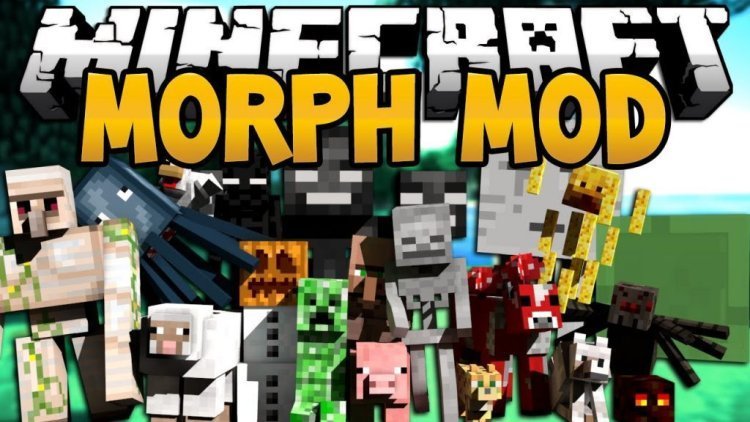
The Morph Mod is one of the most popular and exciting mods ever created for Minecraft. It gives players the power to transform into any mob they encounter in the game, from simple animals to dangerous monsters. Once installed, it completely changes the way you explore and experience Minecraft. You can fly like a bat, swim like a squid, or sneak through tight spaces as a tiny creature. It’s a creative and flexible way to see the world from a new perspective.
Before using the Morph Mod, you need to install the Minecraft Forge API. Forge is required to make most advanced mods work. Go to the official Forge website, download the version that matches your Minecraft version, and install it. Once installed, open your Minecraft launcher and choose the Forge profile so the game runs with mod support.
Next, download the Morph Mod itself. The safest places to get it are the official CurseForge page or a trusted Minecraft modding site. Always check that the mod version matches both your Forge and Minecraft versions. Once downloaded, move the Morph Mod file into the “mods” folder inside your Minecraft directory. If you don’t have a “mods” folder yet, you can create one yourself. After that, open Minecraft again with the Forge profile, and the mod will load automatically.
Once the Morph Mod is running, the fun really begins. The mod adds a new morphing menu to the game, which is usually opened by pressing the M key by default. When you defeat a mob for the first time, you unlock the ability to transform into that creature. The morph menu will display every mob you’ve unlocked, allowing you to switch forms anytime you want. Each form has its own unique powers, abilities, and weaknesses, making every transformation feel different.
The Morph Mod includes dozens of forms to choose from. You can become a flying creature, a water mob, or even a hostile monster. For example, transforming into a bat or a phantom lets you soar through the sky and travel quickly across the map. Turning into a squid or guardian gives you the ability to breathe and move easily underwater. Some forms are tiny, letting you fit into narrow spaces or build in hard to reach areas, while others give you size and strength for combat.
One of the best parts of the mod is how each morph changes gameplay. Flight allows for easy travel and exploration, especially when building tall structures or navigating mountains. Underwater morphs make ocean exploration simple, letting you search for temples or coral reefs without potions or special gear. Some morphs even have attack bonuses or environmental resistances that help you survive in tough conditions. This variety keeps the experience fresh and encourages players to try out new creatures and playstyles.
For builders, the Morph Mod opens up endless creative possibilities. Being able to shrink down into smaller creatures lets you build in tight areas and reach corners you normally couldn’t. You can easily move around massive projects, fly over large structures, or check details from different angles. It’s a tool that makes both survival and creative building more flexible and fun.
Another great thing about the Morph Mod is its compatibility. It was designed to work with other major mods, which means the list of creatures you can morph into keeps growing. If you use mods that add new mobs, those creatures can often be added to your morph list as well. This expands your options and gives you even more freedom to experiment.
The mod also includes simple and intuitive controls. You can open the morph menu with a single key, scroll through available mobs, and select one instantly. Transformations happen smoothly, and you can change back to your normal player form anytime. The transitions look natural, and switching forms in the middle of survival adventures feels exciting and useful.
Using the Morph Mod adds a whole new layer to the Minecraft experience. Exploration becomes faster and more creative, and combat feels different depending on what form you take. It’s also fun to experiment with different creatures to see which abilities work best for your style of play. Some players prefer flying mobs for travel, while others enjoy ground creatures for strength and durability. Every choice feels unique and changes how you play.
Installing and learning the Morph Mod only takes a few minutes, but it can completely change the way you interact with the game. Whether you want to fly across the world, dive deep into oceans, or sneak through caves as a tiny mob, the possibilities are endless. The mod gives you freedom to be whoever—or whatever—you want in the Minecraft world.
In summary, the Morph Mod for Minecraft is a creative and entertaining way to experience the game from every possible angle. It’s easy to install, compatible with other mods, and packed with fun abilities. You can explore faster, build smarter, and play more creatively than ever before. No matter if you’re a survival player, a builder, or just someone who wants to try something new, the Morph Mod is a must have. Download it, unlock your first mob, and discover how much more fun Minecraft can be when you can become anything you encounter.
Share
What's Your Reaction?
 Like
0
Like
0
 Dislike
0
Dislike
0
 Love
0
Love
0
 Funny
0
Funny
0
 Angry
0
Angry
0
 Sad
0
Sad
0
 Wow
0
Wow
0