Best Minecraft addons 2026: Cinematic AFK Camera for Bedrock
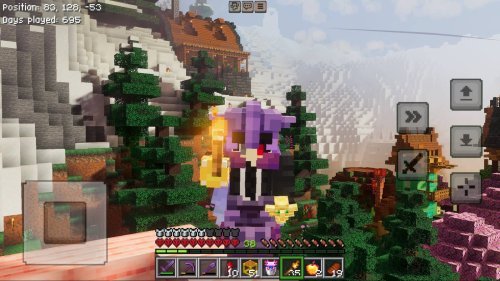
Cinematic AFK Camera addon automatically activates a smooth orbiting camera when you're inactive in Minecraft Bedrock. Perfect for showcasing builds and screenshots.

Created by Iced Fox Studios
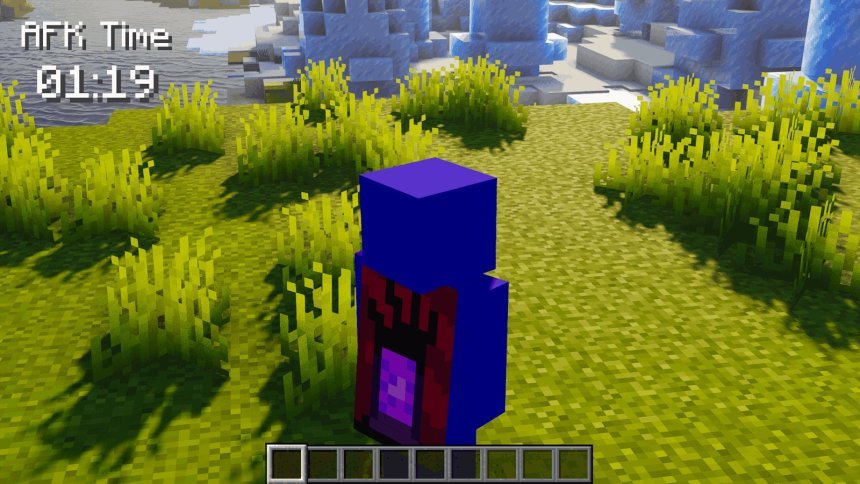
Cinematic AFK Camera is a Bedrock Edition add-on that automatically switches to a cinematic camera view when you stop moving or interacting with the game. Instead of staring at a static screen while AFK, your character becomes the subject of a smooth, orbiting camera that pans around you at varying heights and distances.
If you're looking for minecraft addons 2026 that change how you experience the game without adding new blocks or mobs, this one works differently. It's useful if you're building something impressive and want to capture it properly, or if you just like watching your character stand around in good lighting.

How the cinematic camera works
The add-on watches your input. The moment you stop moving, jumping, or touching the camera controls, a timer starts. Once that inactivity window closes, the camera takes over.
What happens next is the core feature: the camera orbits smoothly around your player character. It doesn't just spin in a circle at eye level. The orbit includes height variation, so the camera dips and rises as it moves, and the distance from your character shifts too. This creates a natural, cinematic feel instead of a basic rotation.
The second you move, jump, look around, or provide any input, the camera snaps back to normal first-person or third-person view. There's no weird transition or lag. You regain control instantly.
Why this addon makes sense for Bedrock players
Bedrock Edition has been missing a lot of the visual tools that Java players take for granted. Cinematic cameras, smooth transitions, and dynamic viewpoints are all harder to achieve on Bedrock without external software or lengthy recording setups.
This add-on fills that gap. You get a professional-looking camera movement without needing to learn command blocks or camera mods. It works in the background, activating only when you're idle. If you're the type of player who builds elaborate structures, farms, or bases, you have a way to let those builds look their best when you step away for a moment.
It also changes how screenshots feel. A well-angled cinematic shot of your character standing in front of a build looks better than a static first-person view. On mobile or console, where recording and editing are less straightforward, having the game do the camera work for you saves time.

What changes when you install this addon
- Idle periods trigger an automatic camera orbit around your character
- Camera height and distance shift during the orbit for visual variety
- Builds, equipment, and skins become visible from more flattering angles
- Your character's surroundings are displayed from multiple angles without you controlling the camera
- Gameplay resumes normally the instant you press a button or move

Addon performance and compatibility
Cinematic AFK Camera is lightweight, it only adjusts the camera position and doesn't add entities or blocks. It shouldn't cause performance problems on lower-end devices. It's built for Minecraft Bedrock Edition, so it works on all Bedrock platforms: Windows, mobile, console, and tablets.
The add-on is designed to work with other packs. You can run it alongside most visual add-ons or gameplay mods without conflicts. If you have other camera-altering add-ons installed, there might be some weirdness, so test it out in a creative world first if you're mixing multiple camera mods.
Who should try this addon
Builders will get the most obvious value here. If you spend time creating detailed structures and want to show them off, this addon gives you automatic cinematic shots without you having to fiddle with camera angles or third-party tools.
Content creators recording for YouTube or TikTok can use this to add visual interest to their footage without editing. The smooth orbits look polished and professional. Survival players who want their idle time to feel more cinematic will appreciate it too. Even in a vanilla-style world, watching the camera pan around while you're AFK is more engaging than staring at a frozen screen.
Players on consoles and mobile will find this valuable since capturing and editing video on those platforms is tedious compared to PC. Having the game produce cinematic camera work automatically saves effort.
How to install the addon
Cinematic AFK Camera comes as a .mcpack file. On most devices, downloading the pack and opening it will launch Minecraft automatically and prompt you to import it into your world or profile. Once imported, apply it to any world as a behavior or resource pack depending on how the creator packaged it.
On mobile, the process is the same, but the file may appear in your downloads folder first. On Windows or console, the pack should open directly in the game launcher.
After installing, start a world with the add-on enabled, stand still for a few seconds, and you should see the camera kick in. Adjust your inactivity timer in the pack settings if the default delay feels too long or too short for your playstyle.
Common questions about this addon
Can I adjust how long before the cinematic camera activates?
Yes. Most Bedrock add-ons have customizable settings. You should be able to change the inactivity timer through the pack configuration so it matches your preference. Some packs let you adjust it in seconds, others in ticks.
Does this addon work with all Minecraft Bedrock skins and armor?
Yes. The cinematic camera just changes the viewpoint. It doesn't touch your character model, so your skin, armor, and equipped items all display normally. That's the whole point, since the camera is designed to show off your character and gear from multiple angles.
Will this addon cause lag or performance issues?
Unlikely. The add-on only adjusts camera position, which is very lightweight compared to rendering new blocks or mobs. Even on older devices, you shouldn't see a noticeable FPS drop. If you do experience frame rate issues, it's probably a conflict with another add-on rather than this one being demanding.
What's the difference between this and manually using third-person camera?
Third-person view shows your character from a fixed distance behind or above you, and you still control the angle. This addon creates an orbiting path that moves on its own, changing height and distance as it goes. It's like having a director positioning the camera for you instead of you pointing it yourself. The movement is intentional and varied, not just a static angle.
Share
What's Your Reaction?
 Like
0
Like
0
 Dislike
0
Dislike
0
 Love
0
Love
0
 Funny
0
Funny
0
 Angry
0
Angry
0
 Sad
0
Sad
0
 Wow
0
Wow
0